What Is a Webhook?
Paste a webhook request to see its parts, or read how webhooks work.
How to use the Webhook request inspector
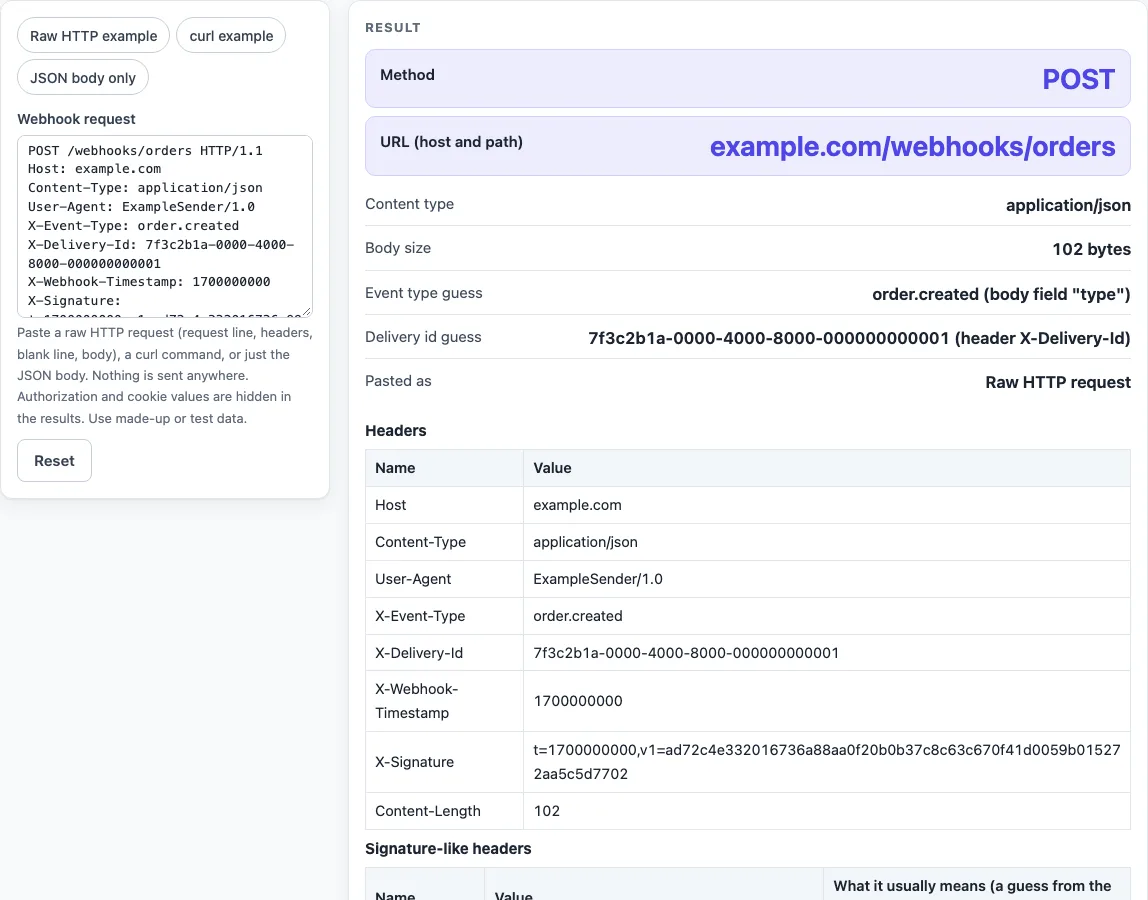
- Look at the Webhook request box. It starts with a raw HTTP sample that uses made-up data on example.com.
- To try another format, click a preset: Raw HTTP example, curl example or JSON body only.
- To check your own request, paste it into the Webhook request text area. Use test values, not live production secrets.
- Read Pasted as to see which format the page detected: “Raw HTTP request”, “curl command” or “JSON body only”.
- Check Method and URL (host and path). If the pasted text does not contain them, the page says so.
- Check Content type, Body size (UTF-8 bytes) and Event type guess. The Delivery id guess appears next to them.
- Review the Headers table and the Signature-like headers table. Values of Authorization, Cookie and similar headers are hidden.
- Read the Body, which is pretty-printed when it is valid JSON, and the “What a receiver should do” list.
The pasted field is never put in the page address, and it is masked in the printed inputs. You can print the page without the pasted secrets appearing in the printed inputs. Use Copy result, Copy link or Print / save as PDF to keep the result, and Reset to return to the sample.
What is a webhook?
A webhook is a server-to-server call. Both the sender and the receiver run an HTTP server, and the receiver needs an address that the sender can reach. That is why this page can read a webhook request but cannot receive one. Webhooks are described by a public community specification, not by an IETF standard.
What is a webhook URL?
A webhook URL is the address of an endpoint on your server that the sender will call. You register it with the sender, and the sender calls it only when an event happens. Keep the endpoint reachable, and use HTTPS for it.
What is a webhook used for?
Webhooks tell you about events as they happen, such as “a user has paid” or “task has finished”. With polling, you ask the service again and again whether something changed. With a webhook, the sender calls you once when it does, so there are fewer wasted requests.
What is a webhook and how does it work?
- You give the sender your webhook URL.
- When the event happens, the sender sends a POST request to that URL.
- Your server checks the request, for example its signature and timestamp.
- Your server answers with a 2xx status quickly.
- Your server handles the event once, even if the same delivery arrives again.
A delivery is an ordinary HTTP request. RFC 9110 section 9.3.3 says POST asks the target resource to process the enclosed representation according to its own semantics. The idempotent methods in RFC 9110 section 9.2.2 are PUT, DELETE and the safe methods, and POST is not among them, so the receiver must handle repeats.
What is the difference between a webhook and an API?
With an API, your client calls the service and asks for something. With a webhook, the service calls your client when something happens. The community specification describes webhooks as part of a service’s API and calls them a sort of “reverse API”.
What does a webhook look like?
A webhook is a normal HTTP POST. The default sample on this page is POST /webhooks/orders HTTP/1.1 with the headers Host, Content-Type: application/json, X-Event-Type, X-Delivery-Id, X-Webhook-Timestamp and X-Signature. Its JSON body has an id, a type of order.created, a created time and a data object holding an order id and a total.
Do webhooks retry?
Often, but each sender sets its own rules. The community specification only recommends retrying over multiple days with exponential backoff and jitter, and a 15 to 30 second request timeout. A non-2xx answer or a timeout usually counts as a failure. RFC 9110 section 15.3.3 says 202 Accepted means the request was accepted for processing, not completed, so read your sender’s documentation.
Is a webhook secure?
A webhook is only as secure as the checks you make on it. The specification says webhooks “are just HTTP requests from an unknown source”. The most common check is an HMAC with a pre-shared secret, computed over the raw body and compared in constant time. Add a timestamp tolerance against replays, a delivery id for idempotency, and HTTPS. A signature protects authenticity and integrity but does not encrypt the payload.
Sources (checked 2026-10-15): RFC 9110; Standard Webhooks specification 1.0.0.
Worked examples
| Input | Result |
|---|---|
| POST /webhooks/orders HTTP/1.1 | POST, event order.created |
| curl -X POST 'https://example.com/webhooks/orders' | POST, event order.created |
| { "id": "evt_2", "action": "created", "data": { "id": 7 } } | JSON body only, event created |
Calculated by the tool above; open it with the same values to see each step.
Frequently asked questions
What is a webhook example?
The curl example preset is a POST with a JSON body whose “type” field is order.created. Click it to see the method, body size and event type guess that the page reads from that request.
Is the text I paste sent anywhere?
No. The page reads the text in your browser, and nothing you paste is sent or stored.
Why does the page say Method is “Not in the pasted text”?
A bare JSON body has no request line or headers, so the page cannot read the method or the URL. A raw request without a Host header also cannot show a full URL.
Why is the Authorization value hidden?
Values of Authorization, Proxy-Authorization, Cookie, Set-Cookie, X-Api-Key, Api-Key and X-Auth-Token are hidden in the output, and so is the value of a -u option. The header still appears with its value hidden.
What does the Content-Length warning mean?
The page compares the Content-Length of a pasted raw request with the pasted body. A difference gets a warning, which can happen when pasting changes line endings.
What is a signature-like header?
It is a header whose name matches a pattern such as signature, hmac, timestamp, event, delivery or idempotency. The meaning shown is a guess from the name only. The page does not check any signature.
What is a web hook?
“Web hook” is another spelling of webhook. It means the same thing: an HTTP request that one service sends to a URL of yours when an event happens.
Related tools
- Webhook tester: use it when you want to test how a webhook request reaches a receiver.
- HMAC SHA256 generator: use it to compute an HMAC SHA256 value for a body and secret you control.
- SHA256 hash generator: use it to compute a SHA256 hash of a piece of text.
- curl to Python converter: use it to turn a curl command into Python code.
- JWT validator: use it to decode a JWT, remembering that decoding is not verifying.
- Unix timestamp converter: use it to read a timestamp header as a date and time.