Webhook Tester
Build a signed test webhook to send to your endpoint, or check the signature of one you received.
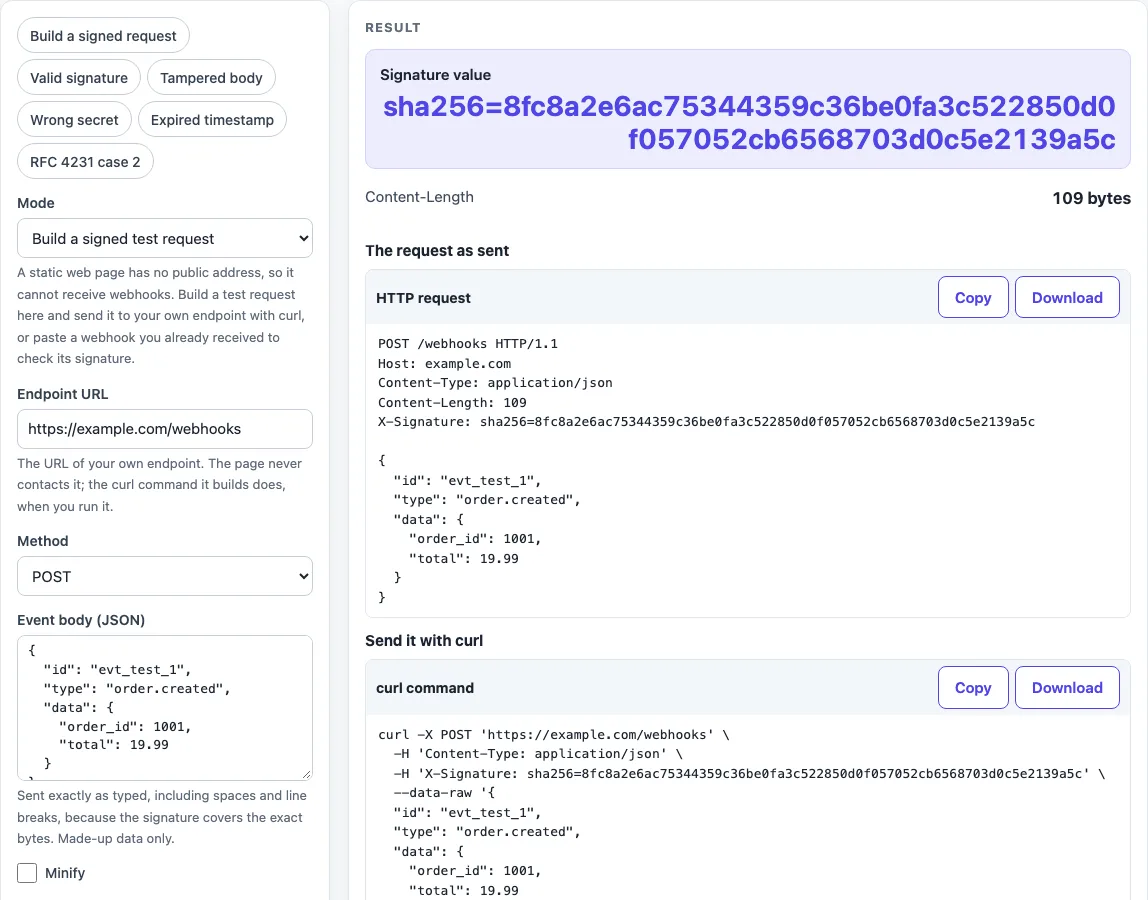
How to use the webhook tester
Choose a “Mode” first. “Build a signed test request” is the default, and “Verify a received webhook” checks a webhook you already have.
To build a request:
- Enter your own endpoint in “Endpoint URL”, starting with http:// or https://.
- Keep “Method” as POST, or choose PUT, PATCH or DELETE.
- Paste your JSON into “Event body (JSON)”. It must be valid JSON and is sent exactly as typed. Turn on “Minify” only if you want it compacted before signing, because that changes the signature.
- Enter a test value in “Signing secret”.
- Pick a “Signature scheme”. If you pick the timestamp scheme, set “Timestamp (unix seconds, blank = now)”.
- Check “Header name” (default X-Signature). Under “More options”, add “Extra headers” with one
Name: valueper line. - Copy the command from “Send it with curl” and run it against your endpoint.
To verify a received webhook:
- Switch “Mode” to “Verify a received webhook”.
- Paste the exact bytes into “Received body (exact bytes)” and the header into “Received signature header value”.
- Enter the “Signing secret” and choose the “Signature scheme”.
- For the timestamp scheme, set “Tolerance (seconds)” and “Now (unix seconds, blank = clock)”.
- Read “Signature matches”. If it says No, read “Why it may not match”.
The presets fill the fields for you: “Build a signed request”, “Valid signature”, “Tampered body”, “Wrong secret”, “Expired timestamp” and “RFC 4231 case 2”. Secrets are never put in the page address, so a copied link does not carry them.
How do I test a webhook?
Run an endpoint that answers HTTP, send it a signed test request, and check that it returns a 2xx and rejects a tampered body. A webhook is an HTTP callback that one service sends to another when an event happens, so the receiver must run an HTTP server.
Webhooks are server-to-server requests, and they are “just HTTP requests from an unknown source”. The receiver therefore has to check authenticity, and the most common way to do that is an HMAC signature made with a pre-shared secret key. The public community webhook specification (version 1.0.0) also recommends a constant-time comparison, a timestamp check within an allowable tolerance to prevent replay attacks, and a delivery ID as an idempotency key. That specification is not an IETF standard. The 300-second tolerance on this page is a default of the tool, not a requirement.
A matching signature shows only that the sender knew the secret and the bytes were not changed. It does not show that the event is real, wanted or new.
Why does my webhook signature not match?
Usually the bytes that were signed are not the bytes that were sent. The specification says the signed payload and the sent payload must be identical, and it warns that many consumers parse the body as JSON and serialise it again, which causes failed verification.
When a signature does not match, the page changes one thing at a time and re-checks. It tries removing trailing whitespace, adding a line break, changing LF to CRLF and CRLF to LF, minifying the JSON, pretty-printing it with two spaces, trimming the secret, and reading the secret as hex or base64 bytes. It also checks whether the header matches another scheme. Each of these is tested on its own, so the result shows which single change explains the mismatch.
Check the usual causes in this order: the body was changed before hashing, the secret is in the wrong encoding, or the wrong header or scheme is being used. A header from the specification’s own layout (webhook-signature with v1,<base64>, signed over msg_id.timestamp.payload) will not verify under this page’s schemes, because the page does not implement that layout.
Sources (checked 2026-10-15): RFC 2104; RFC 4231; RFC 9110; Standard Webhooks specification 1.0.0.
Worked examples
| Input | Result |
|---|---|
| Build, HMAC-SHA256 hex of the body, header sha256=<hex> | sha256=8fc8a2e6ac75344359c36be0fa3c522850... |
| Build, HMAC-SHA256 of timestamp.body, header t=<unix>,v1=<hex>, minified body | t=1700000000,v1=3152f6be4d782abdc933a3348... |
| Verify, HMAC-SHA256 of timestamp.body (t=<unix>,v1=<hex>) | Yes (Within tolerance) |
| Verify, HMAC-SHA256 of timestamp.body (t=<unix>,v1=<hex>) | No (Within tolerance) |
| Verify, HMAC-SHA256 of timestamp.body (t=<unix>,v1=<hex>) | Yes (Outside tolerance) |
Calculated by the tool above; open it with the same values to see each step.
Frequently asked questions
Can this page receive my webhooks?
No. A static page has no public address, so it cannot receive webhooks. Build a test request and send it to your own endpoint with curl, or verify a webhook you already received.
How do I send a test POST with curl?
Keep “Method” set to POST, then copy the command from “Send it with curl”. The body goes in --data-raw inside single quotes, so a body that starts with @ is not read as a file, and line breaks inside the quotes are kept. Content-Length and Host are left to curl.
How do I test webhook signature verification?
Load the “Valid signature” preset and check that “Signature matches” says Yes. Then change one byte of the body, or load “Tampered body”, and check that the result changes to No. The “Why it may not match” section shows the likely cause.
Is it safe to paste my secret?
Use test secrets only. Everything runs in the browser, and nothing pasted is sent anywhere or stored. Treat any live production secret typed into any website as exposed. The page is not a production-grade tool, so do not rely on it for live secrets.
Why is the timestamp rejected?
The timestamp is outside your tolerance. “Timestamp check” shows “Outside tolerance” with the age in seconds, and a negative age is reported as “in the future”. A valid signature with an old timestamp still gets a warning that a receiver enforcing the window would reject it.
What should my endpoint return?
Return a 2xx status code, which RFC 9110 section 15.3 describes as successfully received, understood, and accepted. Do any slow work after you send the response. The sender decides how it retries, so a 2xx is the signal that the delivery succeeded.
Related tools
- What is a webhook: read this first if you are new to how webhooks are sent between services.
- HMAC SHA256 generator: use this when you want to compute an HMAC-SHA256 value from a secret and a message yourself.
- SHA256 hash generator: use this when you need a plain SHA-256 hash of text, without a secret key.
- curl to Python converter: use this when you want to turn the copied curl command into Python code.
- JWT validator: use this when your webhook carries a JSON Web Token, and remember that decoding a token is not verifying it.
- Unix timestamp converter: use this when you need to read a unix seconds value, such as the timestamp in a signature header.