Unix Timestamp Converter
Convert an epoch timestamp to a date, or a date to a timestamp.
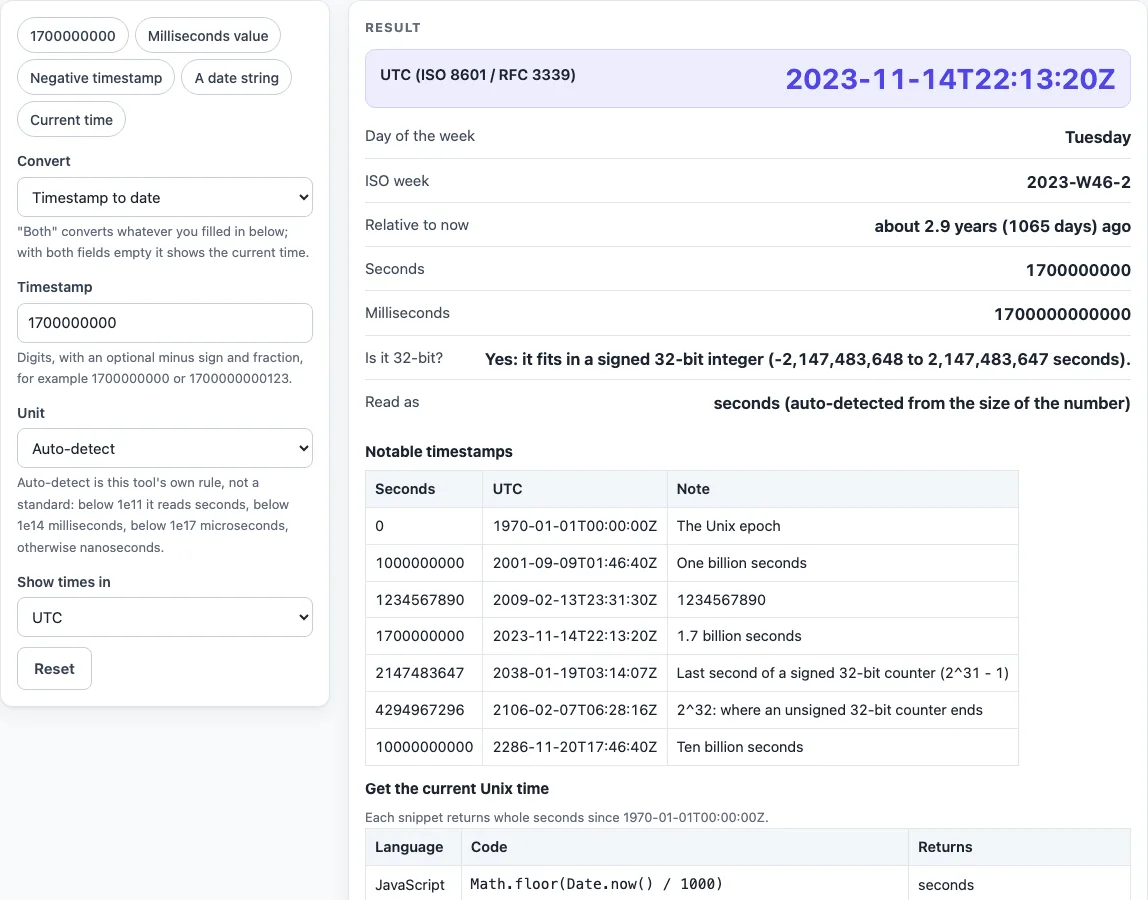
How to use the Unix timestamp converter
- Open “Convert”. Keep “Timestamp to date” selected, or choose “Date to timestamp” to go the other way.
- In “Timestamp”, type or paste the digits. A leading minus or plus and a fraction are allowed. Commas, spaces and exponents such as 1e9 are rejected.
- Leave “Unit” on “Auto-detect”, or pick Seconds, Milliseconds, Microseconds or Nanoseconds yourself.
- Choose “Show times in”: “UTC” (the default), “Browser time zone”, or “Fixed offset”. For a fixed offset, enter a value such as +05:30 in “Fixed offset”.
- Read the results: the UTC output, “Local time” (shown when the zone is not UTC), “Day of the week”, “ISO week”, “Relative to now”, “Seconds”, “Milliseconds”, “Is it 32-bit?” and “Read as”.
- To convert a date, choose “Date to timestamp” and enter “Date and time”, such as 2024-02-29 12:00:00. Add Z or an offset such as +05:30 if you have one. Otherwise, “Interpret as” decides the zone.
- To see the current time, choose “Both (current time)” and leave both fields empty.
The “Presets” give quick examples to try. Below the result, the “Notable timestamps” table lists well-known values, and “Get the current Unix time” shows code for 11 languages. Use Copy result, Copy link or Print / save as PDF to keep the result, and Reset to return to the sample.
How do I convert a Unix timestamp to a date?
Paste the number into “Timestamp” and the tool counts it as seconds since 1970-01-01 00:00:00 UTC. The UTC result uses ISO 8601 and RFC 3339 form, so 1700000000 becomes 2023-11-14T22:13:20Z. Fractions appear only when they are not zero.
Is my timestamp in seconds or milliseconds?
As a rule of thumb, 10 digits means seconds and 13 digits means milliseconds. The tool uses its own size rule: an integer part below 1e11 is seconds, below 1e14 is milliseconds, below 1e17 is microseconds, and anything larger is nanoseconds. This rule is specific to this tool, not a standard. A millisecond value below 1e11 (before 1973-03-03) is therefore read as seconds, and the page warns you when a small value is read as milliseconds. Check “Read as” and pick the unit yourself if it is wrong.
How do I convert a date to a Unix timestamp?
Use “Date to timestamp” and type the date into “Date and time”. The results are “Unix timestamp (seconds)”, “Unix timestamp (milliseconds)” and “That moment in UTC”. “Date read as” shows which zone was used. For example, 2024-02-29 12:00:00 read as UTC gives 1709208000, and the same text with +05:30 gives 1709188200. A missing time counts as 00:00:00, and impossible dates such as 2023-02-29 are rejected.
What is the Unix epoch?
The Unix epoch is 1970-01-01 00:00:00 UTC, the zero point of Unix time. POSIX defines Unix time as “Seconds Since the Epoch”, a value that approximates the number of seconds elapsed since then. Each day counts as exactly 86400 seconds (POSIX, section 4.16), so the value 0 means 1970-01-01T00:00:00Z.
What is the current Unix time?
Choose “Both (current time)” with both fields empty, and the tool shows “Current Unix time (seconds)”, “(milliseconds)”, “Now in UTC” and “Now, local time” from your device clock. Snippets for getting the same number in code are listed in “Get the current Unix time”.
What is the year 2038 problem?
A signed 32-bit seconds counter reaches its largest value, 2147483647, at 2038-01-19T03:14:07Z, and then overflows. The “Is it 32-bit?” output reports whether a value fits between -2147483648 (1901-12-13T20:45:52Z) and 2147483647. An unsigned 32-bit counter would last until 2^32 = 4294967296, which is 2106-02-07T06:28:16Z.
Does Unix time count leap seconds?
No. Unix time does not count leap seconds, so every day is exactly 86,400 seconds. The date inputs reject hour 24 and second 60, so a leap second cannot be entered.
Can a Unix timestamp be negative?
Yes. Negative values count back from 1970-01-01T00:00:00Z, so -86400 is 1969-12-31T00:00:00Z. Enter the minus sign in “Timestamp”, or use the “Negative timestamp” preset. Supported years run from 0000 to 9999, which is seconds -62167219200 to 253402300799. BCE dates are not accepted.
Sources (checked 2026-10-15): POSIX base definitions, 4.16 Seconds Since the Epoch; RFC 3339.
Worked examples
| Input | Result |
|---|---|
| 1700000000 | 2023-11-14T22:13:20Z |
| 1700000000123 | 2023-11-14T22:13:20.123Z |
| -86400 | 1969-12-31T00:00:00Z |
| 2024-02-29 12:00:00 | 1709208000 s |
Calculated by the tool above; open it with the same values to see each step.
Frequently asked questions
Why does the time differ from my local clock?
The default for “Show times in” is “UTC”, so change it to “Browser time zone” or “Fixed offset” to match your clock. “Browser time zone” uses the offset in force at that instant, so daylight saving is taken into account.
What does “Read as” tell me?
It shows which unit was used for the conversion and whether auto-detect chose it. Check it after each conversion, especially for values that are close to the size boundaries.
Why is my input rejected?
Timestamps may contain only digits, an optional sign and an optional fraction. Dates need a four-digit year and two-digit month, day, hour, minute and second. The error message names the problem, for example that a month has too few days for the day entered.
Are very large values converted exactly?
Yes. Timestamps are read exactly, so a 19-digit nanosecond value keeps every digit. Digits beyond nanoseconds are dropped.
Does the converter send my values anywhere?
No. The tool runs in your browser, nothing you enter is sent or stored, and it is free with no account.
Which formats can it convert between?
It converts between Unix time in seconds, milliseconds, microseconds or nanoseconds and an ISO 8601 / RFC 3339 date and time. That covers searches such as convert unix timestamp to datetime, convert unix time to datetime, unix time format converter and unix stamp to date. The “unixtimer” style of lookup, where you only want the current Unix time, is the “Both (current time)” choice.
Can I share or print my result?
Copy result copies the numbers as text, Copy link copies a web address that reopens the tool with your non-secret settings, and Print / save as PDF opens your browser’s print dialog. Secret fields are left out of the link.
Related tools
- UETR generator: create a UETR, a unique reference for a payment message, when you need one for testing.
- curl to Python converter: turn a curl command into Python code when you are calling an API with a timestamp.
- Webhook tester: inspect the timestamps sent with incoming webhook requests.
- JWT decoder: read the text of a token’s parts, remembering that decoding is not verifying the signature.
- SHA256 hash generator: compute a SHA-256 hash of text or a file.