Hash 256 Online (SHA256 Hash Generator)
Type or paste text to get its SHA-256 hash, and the other SHA hashes too.
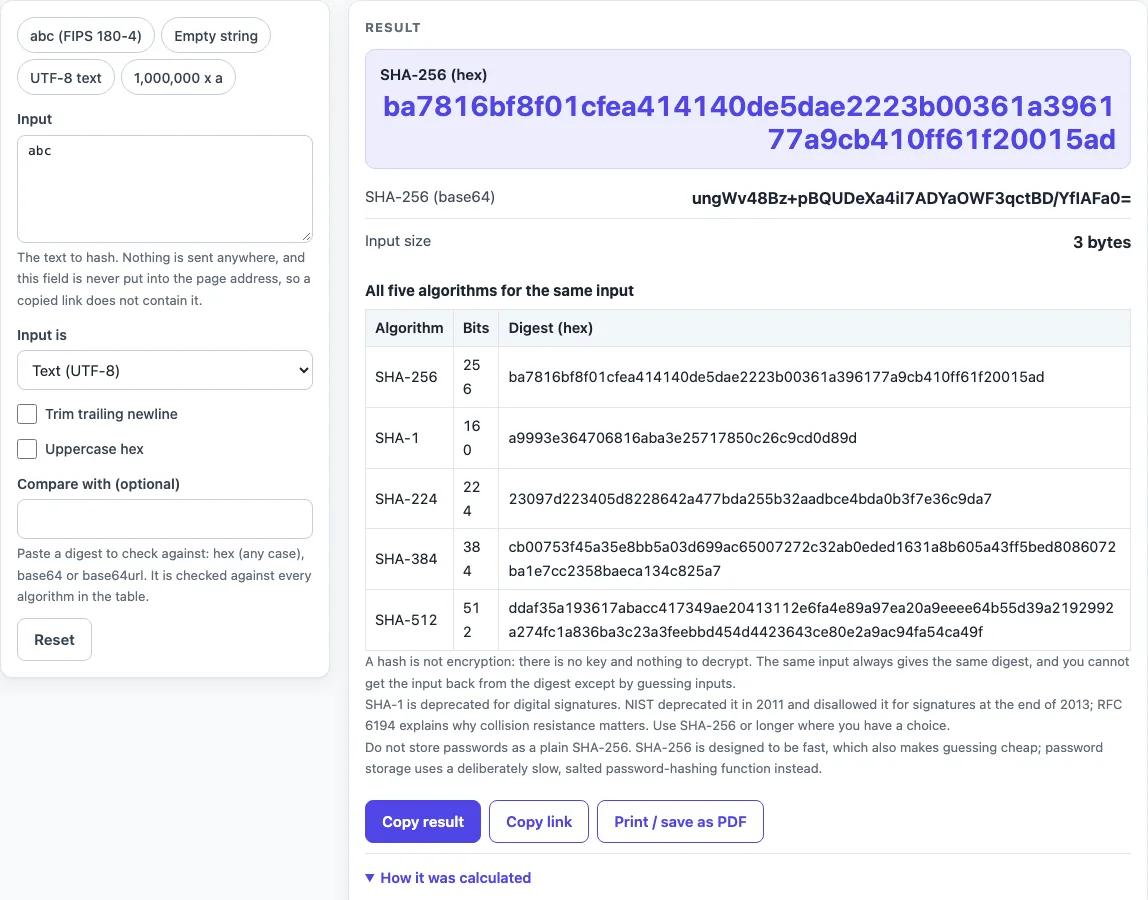
How to use the SHA-256 hash generator
- Type or paste your text into the Input field. The digest updates as you type.
- Leave Input is on Text (UTF-8) for normal text. To hash raw bytes instead, choose Hex bytes and enter hex such as
616263. - If your text ends with a line break you do not want counted, tick Trim trailing newline. It removes one trailing LF or CRLF from text input and has no effect on hex input.
- Read SHA-256 (hex), the primary output, or SHA-256 (base64). Input size shows the number of bytes.
- Optional: paste a known digest into Compare with (optional). Matches the digest you pasted then shows which algorithm matched, or No. Hex in any letter case works, spaces are ignored, and base64 or base64url is also accepted.
- Tick Uppercase hex if you need capital letters. This changes only how the hex is shown, not the digest.
- To test the tool against known values, use a preset: abc (FIPS 180-4), Empty string, UTF-8 text or 1,000,000 x a.
The Input field is never put in the page address, so a pasted password or token does not end up in a shared link. It is also masked in printed inputs.
Is SHA-256 encryption?
No. SHA-256 is a hash function, defined in FIPS 180-4, and it is one-way. It takes input of any length and produces a fixed 256-bit digest, which is 64 hex characters. There is no key, so there is nothing to decrypt. The same input always gives the same digest, which is why a digest is useful for checking whether two byte sequences match.
A digest is a fingerprint of the bytes, not a copy of them. Because the output has a fixed size, it cannot hold the whole original input. This is why the page shows a notice under the result that a hash is not encryption.
Is SHA-1 still OK?
Not where collision resistance matters, and not for digital signatures. NIST deprecated the use of SHA-1 in 2011 and disallowed its use for digital signatures at the end of 2013. In December 2022 NIST published a plan to transition away from its remaining limited use. RFC 6194 (2011), sections 1 and 4, states that attacks on SHA-1 show it is not prudent to use it when collision resistance is required, and it names SHA-256 as the most commonly specified alternative.
The page shows SHA-1 next to the other four algorithms so you can compare the outputs. Showing it is not a recommendation. For new work, choose SHA-256 or a longer SHA-2 digest.
What is the SHA-256 of a text I type?
The input is turned into bytes first, as UTF-8 for text or as the pairs of hex digits you enter, and the hash is taken over those bytes. For the three bytes of abc it is ba7816bf8f01cfea414140de5dae2223b00361a396177a9cb410ff61f20015ad, the first example in FIPS 180-4. The empty input gives e3b0c44298fc1c149afbf4c8996fb92427ae41e4649b934ca495991b7852b855. A single changed byte gives a completely different digest.
Sources (checked 2026-10-15): FIPS 180-4 (NIST); RFC 6194.
Worked examples
| Input | Result |
|---|---|
| "abc" | ba7816bf8f01cfea414140de... |
| empty string | e3b0c44298fc1c149afbf4c8... |
| "Hello, world!" | 315f5bdb76d078c43b8ac006... |
| "Café ☃ 你好" | 1f40a083d50436b6e1e9694f... |
Calculated by the tool above; open it with the same values to see each step.
Frequently asked questions
How do I generate a SHA-256 hash online?
Type or paste your text into Input, and the digest appears in SHA-256 (hex) as you type. Nothing leaves the page. For raw bytes, set Input is to Hex bytes.
Can a SHA-256 hash be reversed?
Not by calculation. The only way to find an input is to guess candidates and compare their digests. That is quick for short or common inputs, and much harder for long, random ones.
Why is my SHA-256 different from another tool?
The bytes differ. A trailing newline is the most common cause. On macOS, echo abc | shasum -a 256 hashes 4 bytes (“abc” plus a newline) and gives edeaaff3f1774ad2888673770c6d64097e391bc362d7d6fb34982ddf0efd18cb. printf abc | shasum -a 256 hashes 3 bytes and gives ba7816bf8f01cfea414140de5dae2223b00361a396177a9cb410ff61f20015ad. Line endings (CRLF versus LF), a byte order mark, or a different text encoding also change the digest.
Is SHA-256 safe for passwords?
Not on its own. A plain SHA-256 is fast by design, which makes guessing cheap. Password storage uses a deliberately slow, salted password-hashing function. This tool has no salt field and no key field; it hashes exactly the bytes you give it. For a digest tied to a secret key, use the HMAC SHA256 generator. Treat any live production secret pasted into any website as exposed, and use test values instead.
What is the SHA-256 of an empty string?
It is e3b0c44298fc1c149afbf4c8996fb92427ae41e4649b934ca495991b7852b855, the digest of zero bytes. The page allows empty input and shows a warning. Select the Empty string preset to see it.
How long is a SHA-256 hash?
It is 256 bits, which is 32 bytes or 64 hex characters. In base64 it is 44 characters with padding. The length stays the same whatever the input size.
Related tools
- Webhook tester: use it when you are working with webhook requests and want to look at them.
- What is a webhook: read this first if webhooks are new to you.
- HMAC SHA256 generator: use it when you need a digest tied to a secret key, which this page does not do.
- curl to Python converter: use it when you have a curl command and want the equivalent Python code.
- JWT validator: use it when you need to check a token, since decoding a token is not the same as verifying it.
- Unix timestamp converter: use it when you need to turn a Unix timestamp into a readable date.