OpenAPI Validator
Paste an OpenAPI document to check it against the rules of the specification.
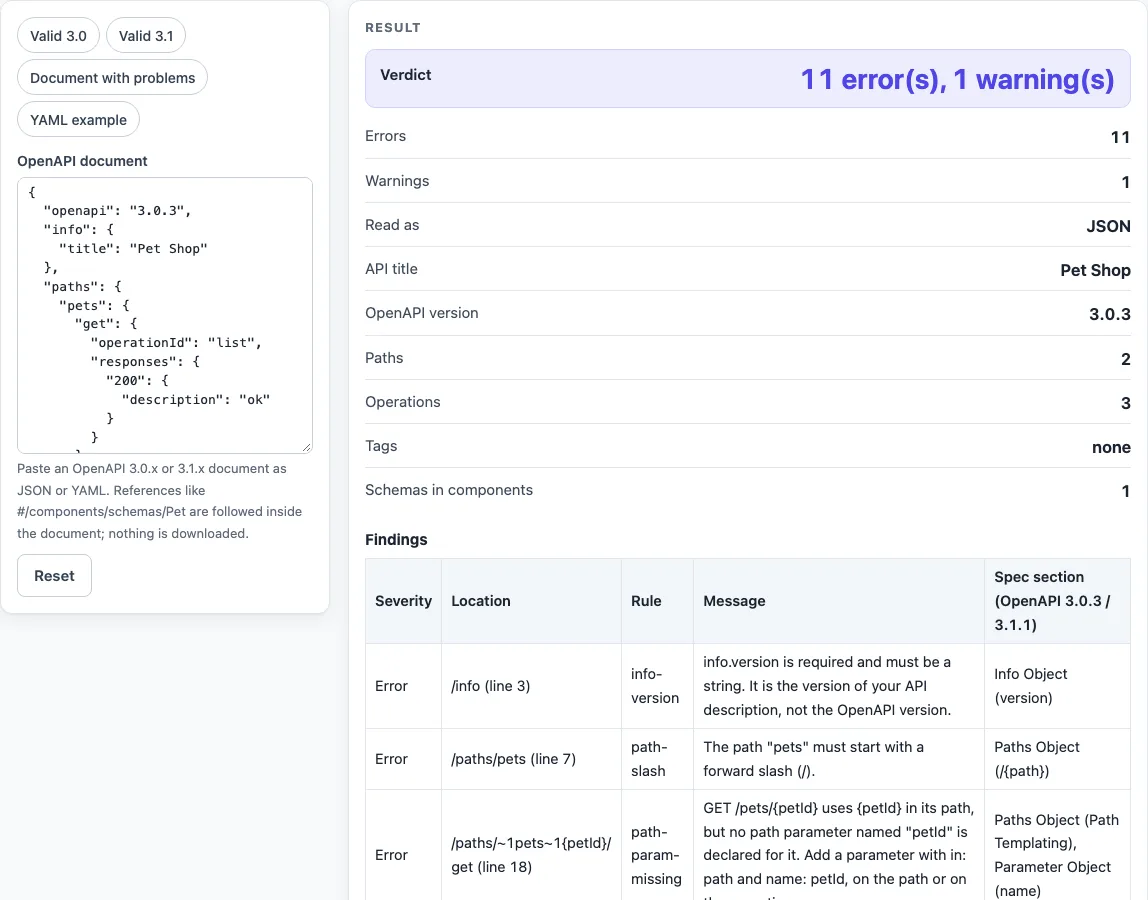
How to use the OpenAPI validator
- Open the OpenAPI document box. It has 14 rows for pasting text.
- Paste your description. Text that starts with
{is read as strict JSON. Anything else is read as YAML 1.2. - To see how results look, choose a preset: “Valid 3.0”, “Valid 3.1”, “Document with problems” or “YAML example”. The page loads with “Document with problems” selected.
- Read the Verdict line. It shows “No problems found by these rules”, “No errors, N warning(s)”, “N error(s), M warning(s)”, or “Cannot read the document (see the table)”.
- Check Read as, OpenAPI version, API title, API version (info.version), Paths, Operations, Tags and Schemas in components to confirm the tool read the document you meant.
- Work through the Findings table. Each row shows a Severity, a Location (a JSON Pointer, with “(line N)” when known), a Rule, a Message and a Spec section (OpenAPI 3.0.3 / 3.1.1).
- Fix the errors first. The table lists errors before warnings, and then sorts by line. Edit the text and read the results again.
This openapi validator online reads documents up to 1,000,000 characters. The Findings table shows the first 300 findings. Use Copy result to copy the numbers as text, Copy link to copy a web address that reopens the tool with your non-secret settings, and Print / save as PDF to keep a record. Reset returns the tool to its starting sample.
Does it check Swagger 2.0?
No. A Swagger 2.0 file uses a swagger field instead of openapi, so the tool gives an error that says so. It reads OpenAPI 3.0.x and 3.1.x only.
What is the difference between this and the official validator?
This page checks a listed set of 43 rules, and each rule is tied to a section of the OpenAPI Specification. It is not a full conformance test against the official OpenAPI JSON Schema, and the page says so under “How it was calculated”. Schema keywords other than type, items and $ref structure, format values, examples against schemas, and x- extensions are not checked.
Why is a path parameter an error?
The spec requires each {name} in a path to have a path parameter with that name, and a path parameter must set required: true. The tool checks the path-level and operation-level parameters together, and it follows a parameter given by $ref. A parameter with in: path whose name does not appear in the path is also an error.
Why is a request body on GET only a warning?
The OpenAPI Specification gives a request body on GET, HEAD, DELETE or TRACE no defined meaning. In 3.0.3, consumers SHALL ignore it, and 3.1.1 says it SHOULD be avoided. The tool warns instead of failing, and it includes TRACE because RFC 9110 section 9.3.8 says a client MUST NOT send content in a TRACE request.
Can it follow $ref to another file?
No. References that start with # are followed inside the document, including chains of references, and a $ref that does not resolve is an error. References to other files or URLs are counted, the first three are listed, and they are never fetched. The page makes no network request.
Does it work for YAML?
Yes. Anchors, aliases and merge keys are expanded, and line numbers refer to your own text. Several documents separated by --- are refused, and a duplicate key is an error. The spec asks for status codes to be quoted, such as "200". An unquoted 200: is read as a key and is not reported.
Is my API description uploaded?
No. The description is checked in your browser, and nothing you paste is sent or stored. Still, treat any live production secret pasted into any website as exposed, and use test values instead.
Sources (checked 2026-10-15): OpenAPI Specification 3.1.1; OpenAPI Specification 3.0.3; RFC 9110.
Worked examples
| Input | Result |
|---|---|
| Pet Shop, 2 path(s) | no errors, 0 warning(s) |
| Pet Shop Events, 0 path(s) | no errors, 0 warning(s) |
| Pet Shop, 2 path(s) | 11 error(s), 1 warning(s) |
| Pet Shop, 1 path(s) | no errors, 0 warning(s) |
Calculated by the tool above; open it with the same values to see each step.
Frequently asked questions
What does “Cannot read the document (see the table)” mean?
The text does not parse as JSON or YAML. For JSON, the table gives the line and column of the first mistake in plain wording. For YAML, the message reads “Line L, column C” with a description. Fix that mistake and read the results again.
Does “No problems found by these rules” mean my API is valid?
No. It means none of the 43 listed rules failed. A document with no findings can still break rules that are not listed, and no result proves that an API or a payload is acceptable.
Which OpenAPI versions does it accept?
It accepts 3.0.x and 3.1.x. A value such as 3.2 gets an error, and the document is then checked with the 3.1 rules. Tooling for 3.1 “SHOULD be compatible with all OAS 3.1.* versions”, so the patch number is not considered.
Is there a size limit?
Yes. Input longer than 1,000,000 characters is refused, and empty input asks you to paste a document. Documents with 2,000 paths that have parameters are checked in well under a second.
Can I share or print my result?
Copy result copies the numbers as text, Copy link copies a web address that reopens the tool with your non-secret settings, and Print / save as PDF opens your browser’s print dialog. Secret fields are left out of the link.
Related tools
- JSON Schema validator: use it to check a JSON document against a JSON Schema.
- JSON Schema generator: use it to draft a schema from a sample document.
- JSON generator from a schema: use it to create sample JSON that matches a schema.
- JSON Schema validation in Python: use it when you check JSON Schema in Python code.
- JSON Schema validation in Java: use it when you check JSON Schema in Java code.
- Base64 to JSON decoder: use it to decode Base64 text into JSON. Decoding only shows the text; it does not verify it.