JWT Validator
Verify a token's signature with your key and check its expiry, issuer and audience.
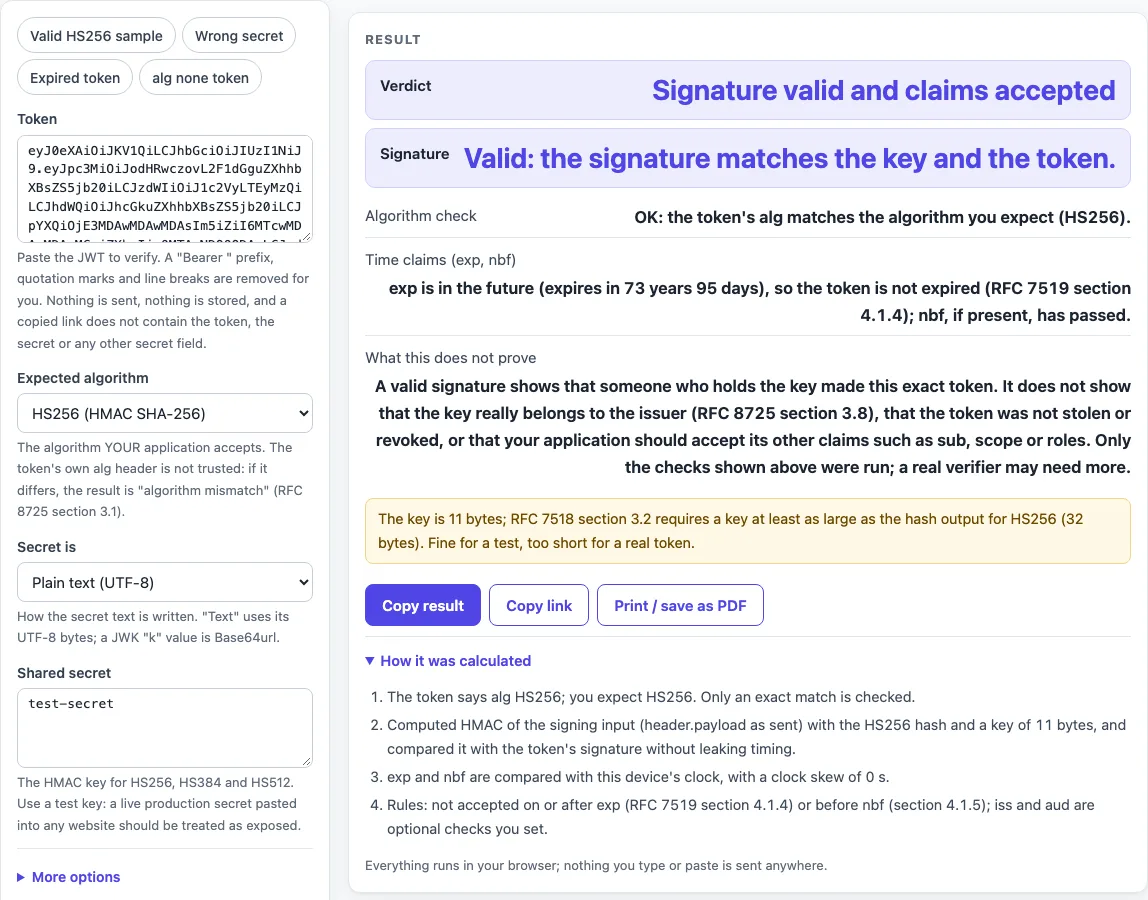
How to use the JWT Validator
- Paste the JWT into the Token field.
- Choose the Expected algorithm, such as HS256 or RS256. Pick the algorithm your system uses. The token’s own header does not decide it.
- For HS256, HS384 or HS512, set Secret is to Plain text (UTF-8), Base64, Base64url or Hex. Then type the key into Shared secret.
- For RS, PS or ES algorithms, paste the public key into Public key. Use a PEM block that starts with “BEGIN PUBLIC KEY” or JWK JSON.
- Open More options for checks beyond the signature. Type an Expected issuer (iss) and an Expected audience (aud) if you need them, since both are optional. Set Clock skew (seconds) if needed. It defaults to 0.
- Read Verdict first, then Signature, Algorithm check and Time claims (exp, nbf). The Issuer (iss) and Audience (aud) lines appear only when you typed an expected value.
The presets show what each result looks like: “Valid HS256 sample” (the default, with the secret test-secret), “Wrong secret”, “Expired token” and “alg none token”. Nothing you enter goes into the page address, so copying the address does not copy your token or secret. Use Copy result to copy the numbers as text, Copy link to copy a web address that reopens the tool with your non-secret settings, and Print / save as PDF to keep a record. Reset returns the tool to its starting sample.
How do I verify a JWT signature?
To verify a JWT, the page recomputes the signature with the key you give and compares it with the signature in the token. The signature covers the signing input, which is BASE64URL(header) + “.” + BASE64URL(payload), exactly as sent. HS256, HS384 and HS512 are HMAC with SHA-256, SHA-384 and SHA-512 using a shared secret (RFC 7518 section 3.2). RS, PS and ES are RSASSA-PKCS1-v1_5, RSASSA-PSS and ECDSA on P-256, P-384 and P-521 (RFC 7518 sections 3.3 to 3.5). Decoding is not verifying: a decoded token is only text until its signature is checked.
What key do I need for RS256?
For RS256 you need the issuer’s public key, never the private key. Enter it as a PEM block that starts with “BEGIN PUBLIC KEY”, or as JWK JSON. The page refuses private keys, whether PEM or a JWK with d, p or q, and it says “do not paste private keys”. It also reports certificates, RSA PKCS#1 keys (“BEGIN RSA PUBLIC KEY”) and keys of the wrong type or curve for the algorithm.
Why does it say algorithm mismatch?
The token’s alg header differs from the Expected algorithm you chose, so the signature is not checked. The verdict reads like “Rejected: algorithm mismatch (token says HS256, you expect RS256)”. A verifier must make sure the token’s alg is the algorithm used for the check, and must not follow the header (RFC 8725 section 3.1). This rule blocks the RS256 to HS256 confusion attack (RFC 8725 section 2.1). A token signed with HMAC using a PEM public key is accepted as HS256 but rejected when RS256 is expected.
Does a valid signature mean I can trust the token?
No. A valid signature only shows that the key holder made the token and that its signed bytes have not changed since. You still need to check exp, nbf, iss and aud, and confirm that the key belongs to the issuer (RFC 8725 sections 3.8 and 3.9). Where aud is present, a recipient that is not named in it MUST reject the JWT (RFC 7519 section 4.1.3). The page also lists what it does not prove, such as revocation, scope, roles and whether the issuer is the right one.
What does the clock skew do?
Clock skew adds leeway, in seconds, to the time checks. A token is rejected as expired on or after exp plus the skew (RFC 7519 section 4.1.4). It is not accepted before nbf minus the skew (RFC 7519 section 4.1.5). The default is 0. The page warns when the skew is above 300 seconds, because RFC 7519 says leeway is usually no more than a few minutes. A token with no exp is accepted with a note, and exp or nbf values in milliseconds, or values that are not numbers, reject the token.
Sources (checked 2026-10-15): RFC 7519; RFC 7515; RFC 7518; RFC 8725.
Worked examples
| Input | Result |
|---|---|
| HS256: eyJ0eXAiOiJKV1QiLCJhb... | Signature valid and claims accepted |
| HS256: eyJ0eXAiOiJKV1QiLCJhb... | Signature invalid: the token was not signed with this key, or it was changed |
| HS256: eyJ0eXAiOiJKV1QiLCJhb... | Signature valid, but the token would be rejected: the token is expired |
| HS256: eyJhbGciOiJub25lIiwid... | Rejected: algorithm mismatch (token says none, you expect HS256) |
Calculated by the tool above; open it with the same values to see each step.
Frequently asked questions
My HS256 secret is Base64; how do I enter it?
Set Secret is to Base64 or Base64url, then paste the encoded value into Shared secret. The page decodes it and uses the resulting bytes, not the text, to compute the HMAC. If your secret is ordinary text, keep Plain text (UTF-8).
How do I validate a JWT from a cloud identity provider?
Copy the issuer’s published public key as JWK or PEM, choose the algorithm the issuer uses (RS256 is common), and paste the key into Public key. Add the expected issuer and audience under More options. This page does not fetch keys, so you must copy the key yourself.
Is my secret sent anywhere?
No. Everything runs in your browser, and no network request is made. The token and shared secret never go into the page address. Even so, treat any live production secret pasted into any website as exposed, and use test values where you can.
Does a pass mean my API should accept this token?
No. A “Signature valid and claims accepted” verdict means the signature matches the key you gave and the checked claims pass. It does not prove revocation, scope or roles, and it does not prove the issuer is the right one. Your own system still has to make the final decision.
Why does the default sample show a key size warning?
The default key, test-secret, has 11 bytes, which is shorter than the 32 bytes that HS256 needs. RFC 7518 section 3.2 says a key of the hash output size or larger MUST be used. The signature still checks out, but the warning is shown separately from the verdict.
Related tools
- JWT decoder: read a token’s header and payload before you check its signature.
- JWT expiration checker: see at a glance whether a token’s exp has passed.
- JWT generator: create test tokens to try in the validator.
- JWT secret generator: make a random key for HS256 testing.
- Token decoder: read token parts without checking the signature.
- Base64url encoder and decoder: convert Base64url values, such as a JWK k value.
- HMAC SHA256 generator: compute an HMAC SHA256 yourself to compare with a result.