JWT Secret Generator
Generate random signing secrets of the right size for HS256, HS384 or HS512.
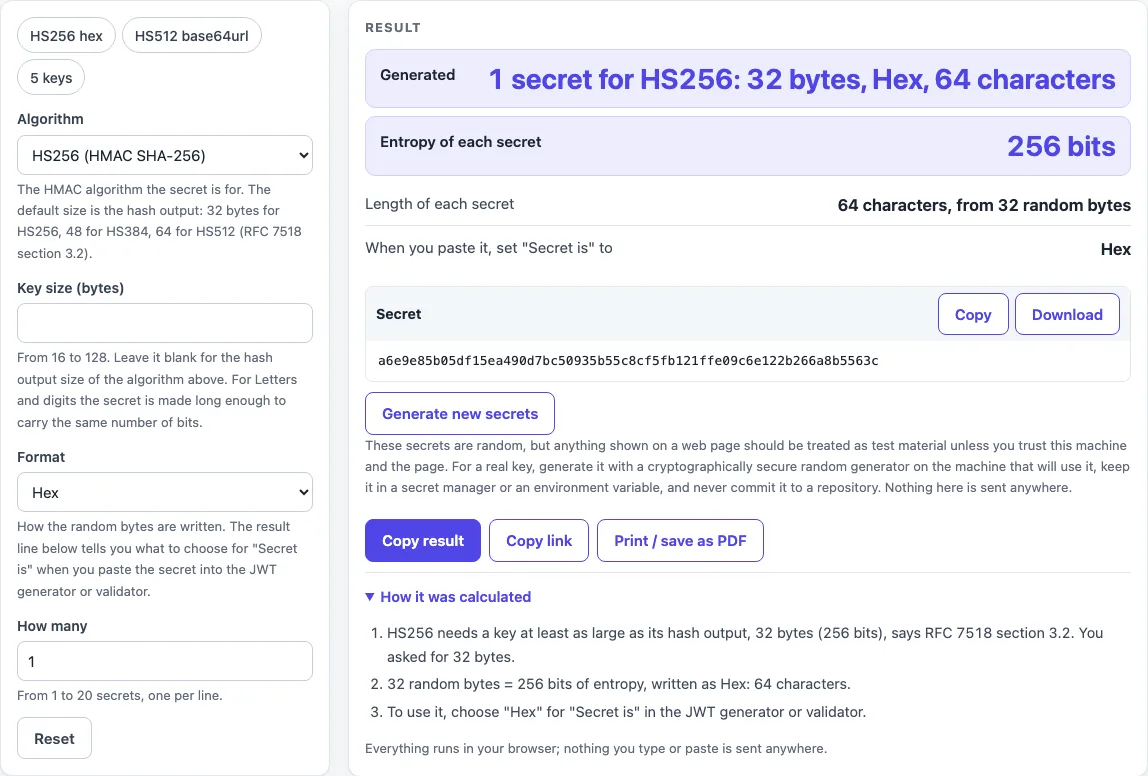
How to use the JWT secret generator
- Choose the Algorithm: HS256, HS384 or HS512.
- Leave Key size (bytes) blank to use the hash output size (32 for HS256, 48 for HS384, 64 for HS512). Or enter a whole number from 16 to 128. Other values give an error message.
- Pick a Format: Hex, Base64, Base64url or Letters and digits.
- Set How many to a whole number from 1 to 20. The default is 1.
- Read the Generated line, then check Entropy of each secret and Length of each secret.
- Copy the secret from the Secret or Secrets block, or select Download to save it.
- Before you paste the secret elsewhere, read the value under “When you paste it, set “Secret is” to” and choose the same option in the JWT generator or validator.
- Select Generate new secrets to get fresh values.
The presets HS256 hex, HS512 base64url and 5 keys fill the controls for common cases in one click. If the key size is below the hash output of your algorithm, the page shows a warning. Use Copy result to copy the numbers as text, Copy link to copy a web address that reopens the tool with your non-secret settings, and Print / save as PDF to keep a record. Reset returns the tool to its starting sample.
How long should a JWT secret be?
A JWT secret for HS256 should be at least 32 bytes (256 bits), the size of the hash output. For HS384 the minimum is 48 bytes and for HS512 it is 64 bytes. RFC 7518 section 3.2 says a key of the same size as the hash output or larger MUST be used.
A longer key only helps up to a point. The effective strength is the minimum of the key strength and twice the hash size, so a key longer than 64 bytes for HS256, 96 for HS384 or 128 for HS512 adds nothing. Any key also needs at least 128 bits of entropy.
How do I generate a JWT secret key?
Take the required number of bytes from a cryptographically strong random source, then write them as hex, base64 or text. This tool does that with the browser’s crypto.getRandomValues from the Web Crypto API. The entropy of a byte-based secret is its key size multiplied by 8 bits.
The same result is available on the command line with openssl rand -hex 32, Python secrets.token_hex(32) or Node crypto.randomBytes(32).toString('hex'). Each produces 32 random bytes written as 64 hex characters. MAC keys must be generated randomly with an adequate random number generator, so do not type a key by hand.
Hex, base64 or plain text: which one?
Any of them works, as long as the side that signs and the side that verifies read the secret the same way. The format only changes how the bytes are written. Hex uses two characters per byte. Base64 uses four characters per three bytes, with padding. Base64url uses the URL-safe alphabet and no padding.
A 32-byte secret is 64 hex characters, 44 base64 characters or 43 base64url characters. A hex secret pasted as plain text is a different, 64-byte key and produces a different signature. That is why the page tells you which option to choose for “Secret is”.
Why is the Letters and digits secret shorter than the hex one?
Each Letters and digits character is one of 62 symbols, so it carries log2(62), about 5.9542 bits. A hex character carries only 4 bits. That is why 43 characters hold 256 bits, where hex needs 64 characters for the same strength.
The characters are chosen without bias: a random byte below 248 selects one character by taking it modulo 62, and bytes from 248 to 255 are skipped. Because the text itself is the key, choose Plain text (UTF-8) for “Secret is”. A 32-character Letters and digits secret holds only 190 bits, so use at least 43 characters for a 256-bit key.
Sources (checked 2026-10-15): RFC 7518; RFC 7515; RFC 8725.
Worked examples
| Input | Result |
|---|---|
| HS256, 32 bytes, Hex, 1 secret(s) | c864cce5b95817ffe987b9d1b99a894af3b9a... |
| HS512, 64 bytes, Base64url, 1 secret(s) | MlaJJEODpGlNuC3FUs-_9FFjCDy_qi-Z6i3r7... |
| HS384, 48 bytes, Hex, 5 secret(s) | ceeca263a0c2cacbdc045d2c989313ce855a7... |
| HS256, 32 bytes, Letters and digits, 1 secret(s) | flS6yqph8wKz2acQgnEHkCAHCPPDzutqCbLPd... |
Calculated by the tool above; open it with the same values to see each step.
Frequently asked questions
Can I use a password or a sentence as the secret?
Not directly. RFC 8725 says human-memorizable passwords must not be used as the key of HS256 or any other HMAC key. Use the random bytes this tool generates instead.
Is a secret generated in a web page safe to use in production?
The page runs in your browser, and nothing you generate is sent or stored, but that does not make the secret suitable for production. Treat it as test material unless you trust the machine. For real keys, generate them where they will be used and keep them in a secret manager or an environment variable, never in a repository. Any live production secret pasted into any website should be treated as exposed.
Is the HS256 secret the same as an RSA private key?
No. HS256 uses one shared secret on both sides, so the signer and the verifier hold the same key. RS256 uses a private and public key pair, where only the private key signs.
What happens if the secret leaks?
Anyone who has the secret can sign valid tokens, and compromise of the MAC key allows undetectable modification of signed content. Replace the secret to stop this. Rotating a secret invalidates every token signed with the old one, so a receiver that only knows the new secret rejects them.
Related tools
- JWT decoder reads the header and payload of a token. Decoding does not check the signature, so use it to inspect a token, not to trust one.
- JWT validator checks a token’s signature against the secret you paste, so use it after you set “Secret is” correctly.
- JWT expiration checker shows the
expand related time claims of a token, for when you need to see whether it has expired. - JWT generator builds and signs a token with your secret, for testing a token in the format you chose.
- Token decoder splits a token into its parts when you want to read its contents without checking the signature.
- Base64url encoder and decoder converts text and bytes to and from the URL-safe base64 format used by JWTs.
- HMAC SHA256 generator computes an HMAC with SHA-256 over a message and a key, for checking the signing step on its own.