JWT Generator
Write a header and payload, add a secret and get a signed test token.
The JWT generator builds and signs a JSON Web Token (JWT) in your browser, using a shared secret that you type in. It is free, with no sign-up and no account. You choose an algorithm (HS256, HS384 or HS512), edit the header and payload as JSON, and the page shows the signed token, its three parts, and the decoded header and payload.
A JWT is three base64url parts joined by dots: header, payload and signature. This tool is useful for creating test tokens for an API that checks HMAC signatures, and for seeing how the parts fit together. Nothing you paste is sent or stored, and the secret is never written into the page address. Use test values, because any live production secret pasted into any website should be treated as exposed.
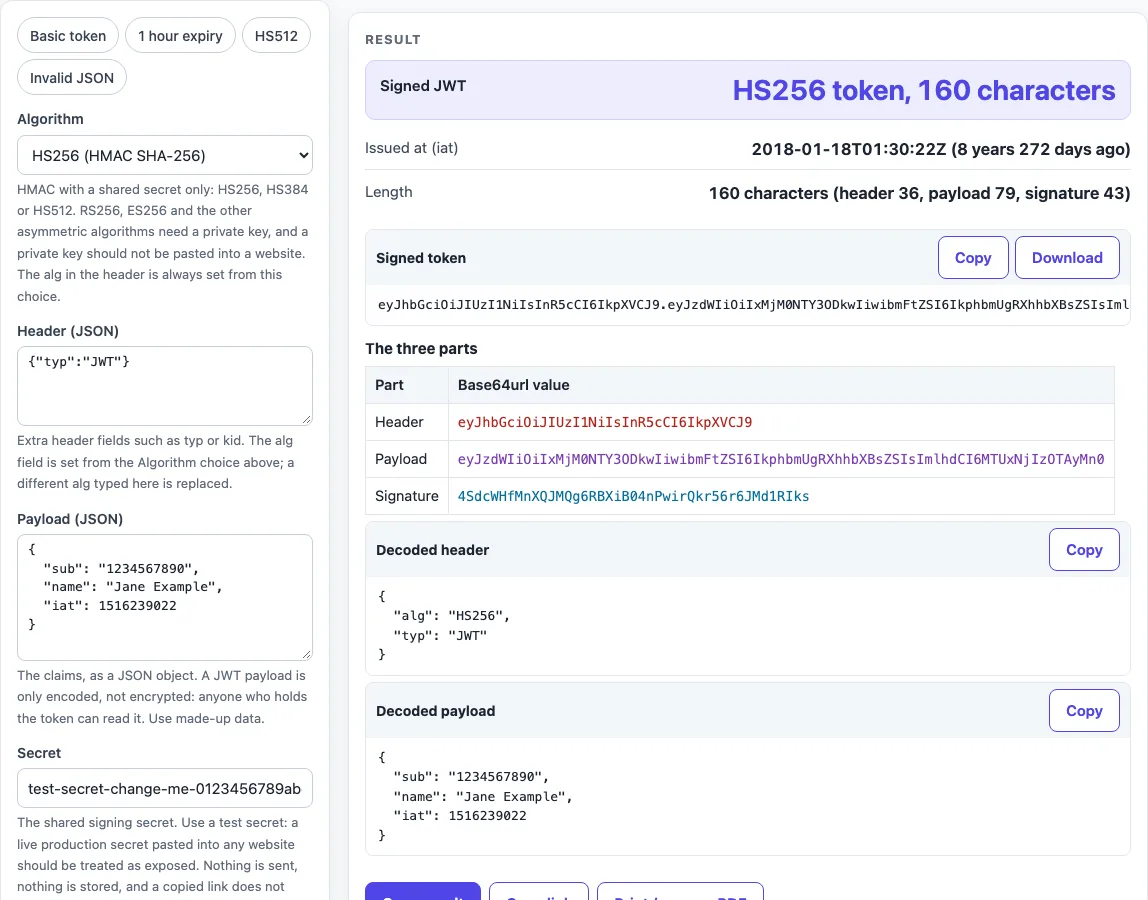
How to use the JWT generator
- Choose an “Algorithm”: HS256, HS384 or HS512. RS256, ES256 and other asymmetric algorithms are not offered.
- Check the “Header (JSON)”. The default is
{"typ":"JWT"}. It must be a JSON object, and empty means{}. Thealgvalue is set from “Algorithm” for you. - Edit the “Payload (JSON)” with your claims. It must be a JSON object, and empty means
{}. The default is a made-up payload. - Type your test value into “Secret”. The field is masked.
- Set “Secret is” to Plain text (UTF-8), Base64 or base64url, or Hex, to match how your receiver reads the secret.
- Optional: pick an expiry from “Add expiry” (None, 15 minutes, 1 hour, 24 hours or 7 days from now). To set only the issue time, tick “Add iat”.
- Read the “Signed JWT” summary and any warnings. Copy the token from the “Signed token” block.
The presets “Basic token”, “1 hour expiry”, “HS512” and “Invalid JSON” fill the fields with example inputs, so you can try the tool quickly. The “Decoded header” and “Decoded payload” blocks each have a Copy button, and the “Signed token” block has a Download option. Use Copy result to copy the numbers as text, Copy link to copy a web address that reopens the tool with your non-secret settings, and Print / save as PDF to keep a record. Reset returns the tool to its starting sample.
How do I generate a JWT?
A JWT is built by encoding a header and a payload, signing the text “header.payload” with HMAC and your secret, and joining the three base64url parts with dots. This page does exactly that, the same way the jwt.sign function in a library does.
The formula is Token = BASE64URL(header) . BASE64URL(payload) . BASE64URL(HMAC(signing input)). The parts are base64url without padding (RFC 7515 section 7.1). The HMAC is taken over the ASCII signing input “header.payload”, with the secret bytes as the key (RFC 7518 section 3.2, HMAC per RFC 2104).
What goes in the header?
The header is a JSON object. The page always sends alg first, set from “Algorithm”. If you type a different alg in the header, it is ignored with a warning, because the receiver must not trust the token’s own algorithm. Usually the header also contains typ set to “JWT”. Add kid only if the receiver looks up keys by id.
How do I set the expiry (expiresIn in minutes)?
A JWT has no minutes field. The expiry is the exp claim, a NumericDate: a number of seconds since 1970-01-01T00:00:00Z (RFC 7519 section 2). For 15 minutes, add 900 seconds to the current time.
“Add expiry” does this for you. It sets exp to now plus the span you pick, and sets iat to now, using the clock on your device. If exp or iat already exists, it is replaced and the page says so. In a library, the expiresIn option works the same way: exp is iat plus the span. The page warns if exp is already in the past, or if a time claim looks like milliseconds (more than 1e11).
What is a good secret for HS256?
Use at least 32 random bytes (256 bits), not a password. A key must be at least as large as the hash output: 32 bytes for HS256, 48 for HS384 and 64 for HS512 (RFC 7518 section 3.2). Human-memorable passwords must not be used directly as HMAC keys, because keys need enough entropy (at least 128 bits, RFC 7515 section 10.1). The page warns when the secret is shorter than the hash output. The JWT secret generator can make a random secret for you.
Sources (checked 2026-10-15): RFC 7519; RFC 7515; RFC 7518; RFC 2104.
Worked examples
| Input | Result |
|---|---|
| HS256, expiry None (leave the payload as typed), payload { "sub": "1234567890", "name": "Jane ... | eyJhbGciOiJIUzI1NiIsInR5cCI6IkpXVCJ9.... |
| HS256, expiry 1 hour from now, payload { "sub": "1234567890", "name": "Jane ... | eyJhbGciOiJIUzI1NiIsInR5cCI6IkpXVCJ9.... |
| HS512, expiry None (leave the payload as typed), payload { "sub": "1234567890", "name": "Jane ... | eyJhbGciOiJIUzUxMiIsInR5cCI6IkpXVCJ9.... |
| HS384, expiry 24 hours from now, payload {"iss":"https://auth.example.com","su... | eyJhbGciOiJIUzM4NCIsInR5cCI6IkpXVCIsI... |
Calculated by the tool above; open it with the same values to see each step.
Frequently asked questions
Can I generate a token with RS256 or ES256 here?
No. RS256, ES256 and other asymmetric algorithms sign with a private key, and a private key should not be pasted into a website. Only HS256, HS384 and HS512 are offered.
Is the payload encrypted?
No. The payload is base64url-encoded, not encrypted, so anyone who has the token can read it. Signing gives integrity, not secrecy, so do not put passwords or API keys in the payload.
Is my secret sent anywhere?
No. Nothing is sent or stored, and the “Secret” field is never written into the page address or read from it. Treat any live production secret pasted into any website as exposed, and use test values instead.
Why does my API say invalid signature?
The usual causes are a different secret encoding (check “Secret is”), a different algorithm, or a header or payload that changed after signing. Signing a token does not make its claims acceptable to an API, because the receiver still checks the signature, exp, iss, aud and its own rules. To check a token, use the JWT validator.
Can I share or print my result?
Copy result copies the numbers as text, Copy link copies a web address that reopens the tool with your non-secret settings, and Print / save as PDF opens your browser’s print dialog. Secret fields are left out of the link.
Related tools
- JWT decoder: read the header and payload of a token you already have.
- JWT validator: check a token’s structure and signature with the key you choose.
- JWT expiration checker: see when a token’s
expandiatfall. - JWT secret generator: create a random secret before you sign a token.
- Token decoder: decode a token that is not a JWT in the usual form.
- Base64url encoder and decoder: convert the base64url parts of a token by hand.
- HMAC SHA256 generator: compute an HMAC SHA-256 value on its own.