JSON Schema Validator
Paste a schema and some JSON to see whether the data is valid and where it is not.
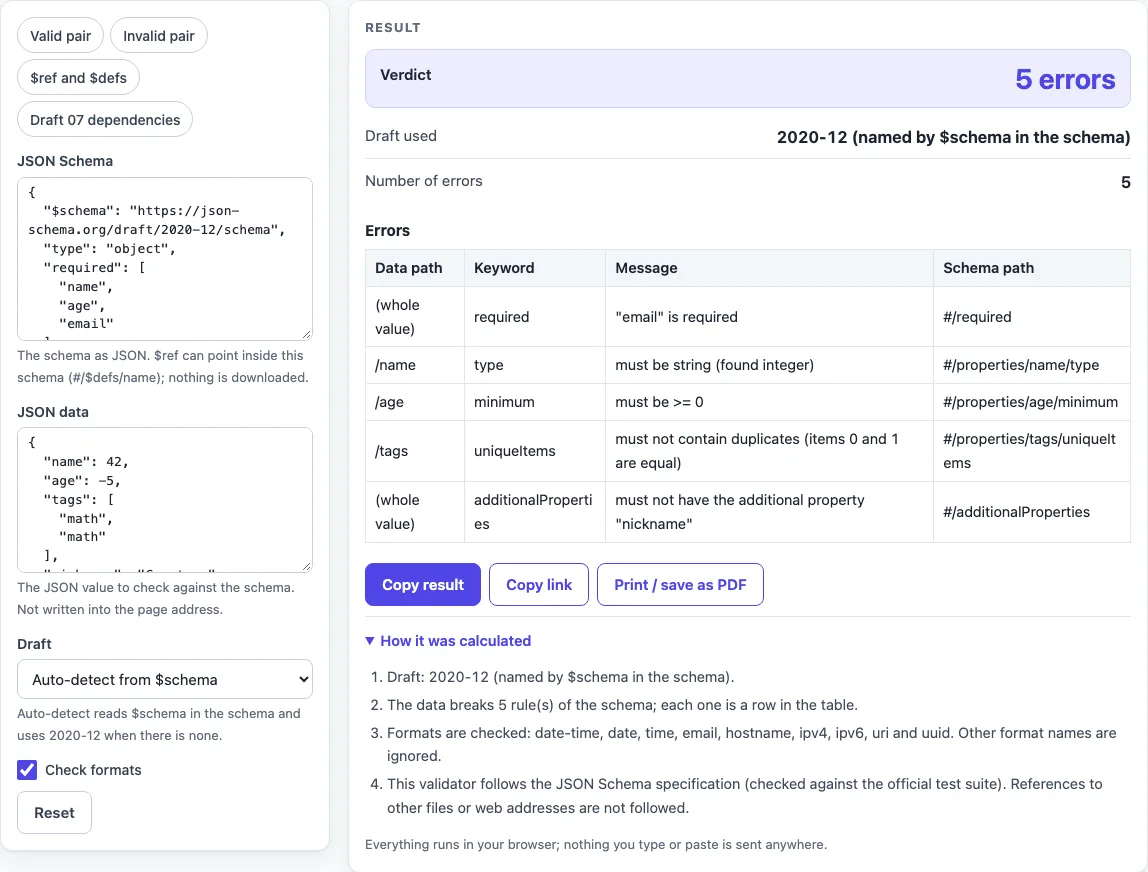
How to use the JSON Schema validator
- Paste your schema into the “JSON Schema” box. You can also pick a preset to start.
- Paste the JSON you want to check into the “JSON data” box.
- Leave “Draft” on “Auto-detect from $schema”, or choose 2020-12, 2019-09, Draft 07, Draft 06 or Draft 04 yourself.
- Tick “Check formats” if you want values such as email, date-time or uuid to be checked.
- Read “Verdict”. It shows “Valid”, “1 error” or “N errors”.
- Read “Draft used” to see which draft ran and why.
- Go through the “Errors” table. “Data path” shows where the problem is in your data, “Keyword” names the rule, “Message” explains it, and “Schema path” shows where the rule sits in the schema.
- If you see “Cannot check yet”, fix the line and column it names in whichever box it mentions. Nothing is checked until both boxes parse.
The presets are “Valid pair”, “Invalid pair”, “$ref and $defs” and “Draft 07 dependencies”. The page loads with the “Invalid pair” preset, which gives 5 errors. The “JSON data” box is never written into the page address and is masked in printed inputs. Fields that can hold secrets are never put in the page address or in a copied link. Use Copy result, Copy link or Print / save as PDF to keep the result, and Reset to return to the sample.
Which draft does it use?
It uses the draft named by the $schema keyword in your schema. If $schema is missing or names an unknown URI, it uses 2020-12, and the “Draft used” output says so. The page accepts the five official URIs with or without a trailing #.
You can override this with the “Draft” select. A chosen draft overrides $schema, and the page then says which $schema value it ignored.
Each draft adds or changes keywords. const arrived in draft-06, if/then/else in draft-07, and prefixItems and $dynamicRef in 2020-12. A draft ignores keywords it does not have and reports them as a note, such as “prefixItems does not exist in draft-07”.
The biggest difference is $ref. In drafts 04 to 07, a $ref makes every sibling keyword inert. From 2019-09 onward, those siblings are evaluated too.
The integer type accepts 1.0 in every draft, because JavaScript cannot tell 1.0 from 1.
Why does format not fail?
format is only an annotation by default, so a malformed email or date passes. Tick “Check formats” to make the page check it.
The specification allows this default in section 7.2.1. An implementation may assert formats, but it must offer a switch to turn that on and off, and the default is off. This page follows that default, so you decide.
With the box ticked, the page checks date-time, date and time (draft 07 and later), email, hostname, ipv4, ipv6, uri, and uuid (2019-09 and later). Other format names are ignored. The page applies its own rules for dates and leap years, allows a leap second only at 23:59:60 UTC, rejects leading zeros in IPv4, and requires host-name labels of 1 to 63 letters, digits and hyphens.
IDN and punycode host names, uri-reference, iri, json-pointer and regex formats are not checked.
Sources (checked 2026-10-15): JSON Schema specification.
Worked examples
| Input | Result |
|---|---|
| schema with name, age, email, tags | valid |
| schema with name, age, email, tags | 5 error(s) |
| schema with billing, shipping | 1 error(s) |
| schema with name, credit_card, billing_address | 1 error(s) |
Calculated by the tool above; open it with the same values to see each step.
Frequently asked questions
How do I validate JSON against a schema online?
Start with the “Valid pair” preset to see what a passing result looks like. Then change the data in “JSON data” until the rule you care about fails, and read the row that appears in “Errors”.
Is my JSON uploaded?
No. The check runs in your browser, and nothing you paste is sent anywhere or stored. Use test values, not live production secrets; any live production secret pasted into any website should be treated as exposed.
What does “must not have the additional property” mean?
The schema sets additionalProperties to false, and the data has a key the schema does not list. In the “Invalid pair” preset, the key “nickname” triggers this message, with the schema path #/additionalProperties.
Can it follow a $ref to another file or URL?
No. It only follows references inside the schema, including $id and $anchor targets. A reference to a web address or file produces a “cannot resolve $ref” row, and nothing is downloaded. The “$ref and $defs” preset shows a working internal reference.
Is the same check available in Python or Java?
Yes. The Python and Java pages generate runnable code for the same schema and data, using the jsonschema package in Python and a networknt library in Java. In a Python cross-check, 16 of 17 test pairs gave the same keywords and data paths; the one difference was multipleOf with floating-point numbers.
Is it the same as other JSON Schema validators?
It follows the same specification and was run against the official JSON-Schema-Test-Suite. It passes all of it except a few groups: checking a schema against its meta-schema, remote references, custom vocabularies and punycode host names. Error messages are worded differently from other tools.
Related tools
- JSON Schema generator: create a schema from an example JSON document when you do not have one yet.
- JSON generator from a schema: build sample JSON data from a schema to test against.
- JSON Schema validation in Python: run the same check in your own Python code.
- JSON Schema validation in Java: run the same check in a Java project.
- OpenAPI validator: check API documents when your schemas sit inside an OpenAPI file.
- Base64 to JSON decoder: turn encoded text into readable JSON before you validate it.