JSON Schema Validation in Python
Validate JSON against a schema here, then copy the Python script that does the same.
jsonschema package. Paste a schema and your data, choose a draft, and the page shows a verdict and a table of errors, then gives you a validate.py file to run on your own machine. The tool runs in your browser, is free, and needs no sign-up. The checker on this page is the same one used on the JSON Schema validator page, so the verdict comes from this page, not from Python. Use the script to see how the jsonschema package will check your data before you add the check to your project.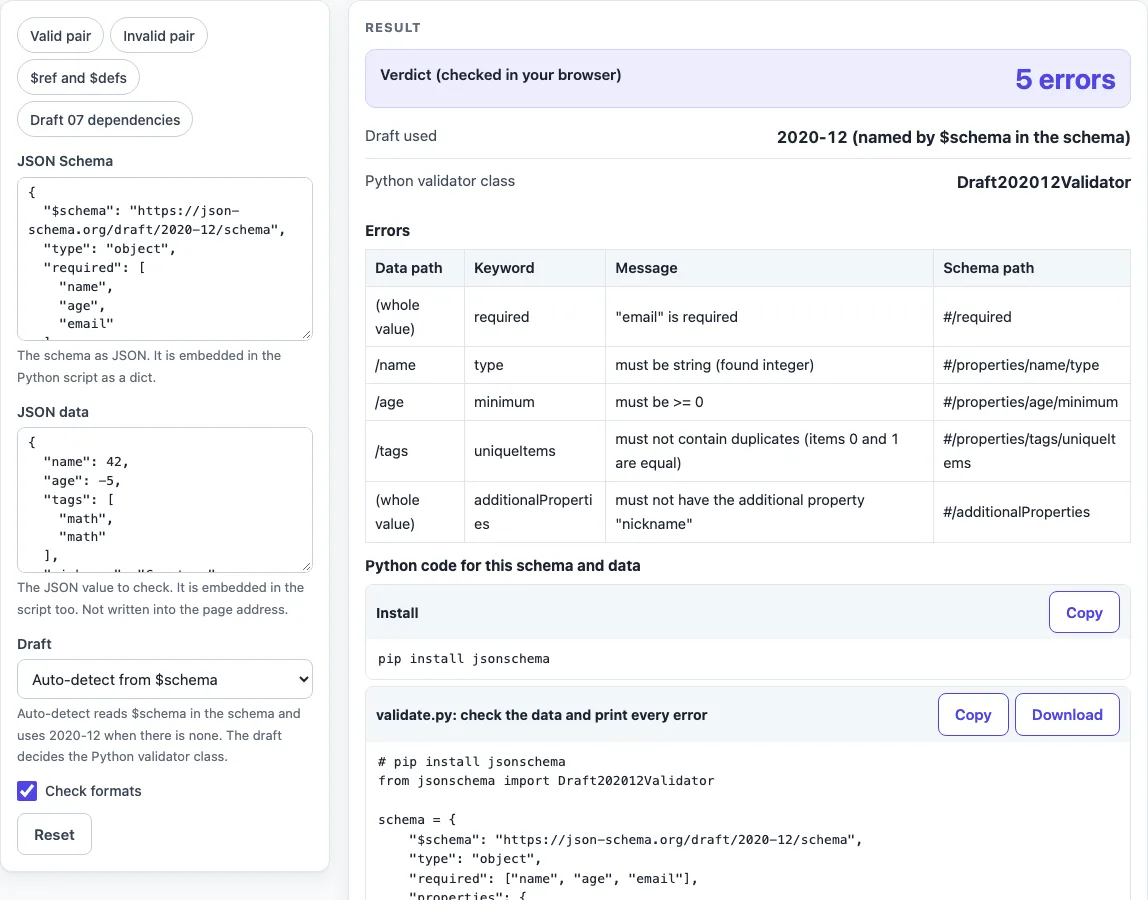
How to use the JSON Schema validation in Python tool
- Paste your JSON Schema into the JSON Schema box.
- Paste the data you want to check into the JSON data box. The data is never written into the page address.
- Set Draft to “Auto-detect from $schema”, or choose 2020-12, 2019-09, Draft 07, Draft 06 or Draft 04.
- Turn Check formats on if you want formats such as date and email checked. Leave it off to skip them.
- Read Verdict (checked in your browser), Draft used, Python validator class and the errors table with its Data path, Keyword, Message and Schema path columns. A pass means the data fits the schema, not that it is right for your application.
- In the “Install” block, run
pip install jsonschema. - Copy the code from “validate.py: check the data and print every error”, or use Download as validate.py, then run
python validate.py.
The presets “Valid pair”, “Invalid pair”, “$ref and $defs” and “Draft 07 dependencies” load example text, so you can see the output before you use your own data. If a box does not contain valid JSON, the page shows the line and column and writes no script. For a shorter script, use the “Shorter: validate() raises one error” block.
How do I validate JSON against a schema in Python?
Install the package with pip install jsonschema, then create a validator for your draft and loop over its errors. The generated script loads the schema and data as Python values, calls Cls.check_schema(schema) to stop on a broken schema, and then runs validator.iter_errors(instance).
Errors are sorted with a key that turns each path part into text, because Python 3 cannot compare an integer index with a string key. The order is therefore by path text, not by numeric index. Each error prints as “/path: message [keyword]”, and the root shows as “(whole value)”.
What is the difference between validate() and iter_errors()?
iter_errors() yields every ValidationError, so you see all the problems at once. jsonschema.validate(instance=..., schema=...) checks the schema first and raises ONE ValidationError, the best match. It picks the validator class from $schema, or uses the latest draft when there is none. The short block on this page passes cls= only when the draft you chose differs from that default.
How do I pick the draft?
The draft decides which keywords and rules apply. Use the class that matches your schema: Draft4Validator for draft-04, Draft6Validator for draft-06, Draft7Validator for draft-07, Draft201909Validator for 2019-09, and Draft202012Validator for 2020-12. Alternatively, keep $schema in the schema and call validate(), which chooses the class for you. On this page, leave Draft on “Auto-detect from $schema” unless you need to override it.
Why does my multipleOf 0.1 fail in Python for 0.3?
Python divides floats in binary, and 0.3 / 0.1 equals 2.9999999999999996, so the check fails even though 0.3 is a decimal multiple of 0.1. In the tested versions, the jsonschema package reports 0.3 as an error for {"multipleOf": 0.1}, and 19.99 as an error for {"multipleOf": 0.01}. This page uses a decimal-safe check and accepts both. To get the same result in Python, scale the numbers to whole units (for example, tenths as integers) or use a decimal-based check in your own code.
Sources (checked 2026-10-15): JSON Schema specification; jsonschema (Python package) documentation.
Worked examples
| Input | Result |
|---|---|
| schema and data as Python literals for Draft202012Validator | valid, prints "valid" |
| schema and data as Python literals for Draft202012Validator | 5 error(s) printed |
| schema and data as Python literals for Draft202012Validator | 1 error(s) printed |
| schema and data as Python literals for Draft7Validator | 1 error(s) printed |
Calculated by the tool above; open it with the same values to see each step.
Frequently asked questions
Is my data uploaded?
No. Everything runs in your browser, and nothing you paste is sent anywhere or stored. Fields that can hold secrets are never put in the page address or in a copied link. Still, any live production secret pasted into any website should be treated as exposed, so use test values where you can.
Does it check the “format” keyword?
Only when Check formats is on, and then the script builds the validator with format_checker. A plain pip install jsonschema enforces only date, email (which only checks that the text contains @), ipv4, ipv6 and uuid. Install pip install "jsonschema[format]" to also enforce date-time, time, hostname and uri.
Why does the script print one line for several extra keys?
With additionalProperties set to false and three extra keys, Python prints one error for all of the extra keys, while this page shows one row per key. The keyword and path are the same in both, so the result is the same.
How do I load the schema from a file?
Use json.load on the file: import json, then with open("schema.json") as f: schema = json.load(f). This page embeds the text in the script so it runs on its own, but for large inputs loading from a file is the safer choice.
Why does the page warn about nesting deeper than 90 levels?
Python’s parser limits how deeply brackets can nest in source code. In tests on Python 3.9.6, 190 levels compiled and 210 gave “SyntaxError: too many nested parentheses”. The page warns from 90 levels, and the advice is to load the data with json.load from a file instead of embedding it.
Related tools
- JSON Schema validator: check data against a schema in the browser without writing any Python.
- JSON Schema generator: create a starting schema from example JSON when you have no schema yet.
- JSON generator from a schema: produce sample JSON that follows a schema, useful for test data.
- JSON Schema validation in Java: the same kind of check when your project uses Java.
- OpenAPI validator: check API specifications when your schemas sit inside an OpenAPI document.