JSON Schema Validation in Java
Validate JSON against a schema here, then copy the Java class that does the same.
json-schema-validator library. You paste a schema and some JSON, read the verdict and the errors table, then copy or download a Validate.java file to compile and run yourself. Everything runs in the browser, with no sign-up and no account. The JSON you paste is not sent anywhere or stored. The generated code targets version 3.0.8 of the library, which needs Java 17 or newer. The verdict above the code comes from the page’s own checker, so treat the Java program as a second check you run yourself.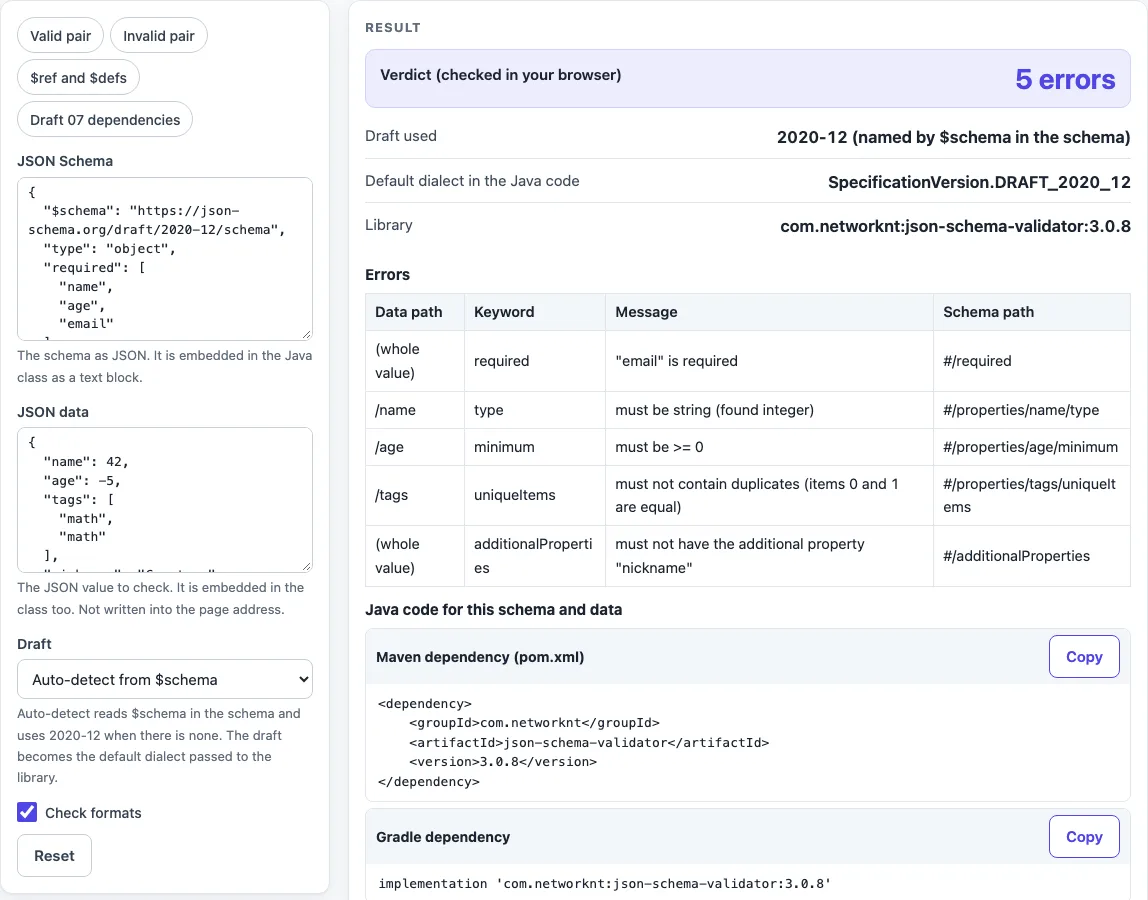
How to use the Java JSON Schema validator
- Paste your schema into the “JSON Schema” box, or choose a preset: “Valid pair”, “Invalid pair”, “$ref and $defs” or “Draft 07 dependencies”.
- Paste the JSON you want to check into the “JSON data” box.
- Pick a “Draft”, or keep “Auto-detect from $schema”.
- Turn on “Check formats” if format keywords such as email should be enforced.
- Read “Verdict (checked in your browser)”, “Draft used” and “Default dialect in the Java code”.
- Review the errors table (Data path, Keyword, Message, Schema path).
- Copy the dependency from “Maven dependency (pom.xml)” or “Gradle dependency”.
- Click “Copy” or “Download as Validate.java”, then compile and run it with
javac -cp <jars> Validate.javaandjava -cp <jars>:. Validate.
If a box does not hold valid JSON, the page shows the line and column and writes no class. If your Java code contains non-ASCII text, save the file as UTF-8 and compile with javac -encoding UTF-8 Validate.java. Use Copy result to copy the numbers as text, Copy link to copy a web address that reopens the tool with your non-secret settings, and Print / save as PDF to keep a record. Reset returns the tool to its starting sample. Press Reset to go back to the sample.
How do I validate JSON against a JSON Schema in Java?
Add the library, create a registry, and compile the schema text into a Schema. Then call validate on the data text: an empty list of errors means the data is valid.
SchemaRegistry registry = SchemaRegistry.withDefaultDialect(SpecificationVersion.DRAFT_2020_12, builder -> {});
Schema schema = registry.getSchema(schemaJson, InputFormat.JSON);
List<Error> errors = schema.validate(dataJson, InputFormat.JSON);
The generated class does this and prints “valid” or one line per error, with the instance location, the message and the keyword.
Which Maven dependency?
Use com.networknt:json-schema-validator:3.0.8, with groupId com.networknt, artifactId json-schema-validator and version 3.0.8. For Gradle, use implementation 'com.networknt:json-schema-validator:3.0.8'. Maven or Gradle also pulls in the library’s own dependencies, such as Jackson, which this page does not list.
How do I enable format checking?
Tick “Check formats”. The generated code then adds executionContext -> executionContext.executionConfig(executionConfig -> executionConfig.formatAssertionsEnabled(true)) to the validate call. Without it, the code calls plain schema.validate(dataJson, InputFormat.JSON). Since draft 2019-09, the format keyword only produces annotations by default, so this checkbox is what makes format errors appear. In testing, email, ipv4 and date were enforced. Which formats are checked depends on the library version and dialect.
Which drafts are supported?
The “Draft” control offers Auto-detect from $schema, 2020-12, 2019-09, Draft 07, Draft 06 and Draft 04. These map to DRAFT_2020_12, DRAFT_2019_09, DRAFT_7, DRAFT_6 and DRAFT_4. The library follows the $schema value in your schema. If your chosen draft differs from it, the page shows a note, and the Java code still follows $schema. Without $schema, the chosen draft becomes the default.
Sources (checked 2026-10-15): JSON Schema specification; networknt json-schema-validator.
Worked examples
| Input | Result |
|---|---|
| schema and data as Java text blocks, SpecificationVersion.DRAFT_2020_12 | valid, prints "valid" |
| schema and data as Java text blocks, SpecificationVersion.DRAFT_2020_12 | 5 error(s) printed |
| schema and data as Java text blocks, SpecificationVersion.DRAFT_2020_12 | 1 error(s) printed |
| schema and data as Java text blocks, SpecificationVersion.DRAFT_7 | 1 error(s) printed |
Calculated by the tool above; open it with the same values to see each step.
Frequently asked questions
Which Java version is needed?
Version 3.x of the library needs Java 17 or newer, and the generated code uses text blocks, which need Java 15 or newer. It was tested with OpenJDK 17.0.17. The 2.x line supports Java 8, but it uses a different API that this page does not generate.
Why do I get “Unknown dialect”?
The registry was built with withDialect(...) for one draft, but the schema’s $schema names another. That throws InvalidSchemaException. The generated code uses withDefaultDialect, which follows $schema when it is present.
Is my data uploaded?
No. The check runs in your browser, the “JSON data” box is never written into the page address, and nothing pasted is stored. Any live production secret pasted into any website should be treated as exposed, so use test values instead.
Does the Java code always match the verdict?
Not guaranteed. In testing, 14 schema and data pairs gave the same keyword and location in the Java output as on the page, but the wording of messages differs. Another library version may change the API, and the code was tested only with 3.0.8 on Java 17.
Can I share or print my result?
Copy result copies the numbers as text, Copy link copies a web address that reopens the tool with your non-secret settings, and Print / save as PDF opens your browser’s print dialog. Secret fields are left out of the link.
Related tools
- JSON Schema validator: check JSON data against a schema in the browser, without generating code.
- JSON Schema validation in Python: use this when your project runs on Python instead of Java.
- JSON Schema generator: create a starting schema from sample JSON.
- OpenAPI validator: check API documents when your schemas live inside an OpenAPI file.