JSON Schema Generator
Paste sample JSON to get a JSON Schema that describes it.
A JSON Schema generator reads one or more sample JSON documents and infers a JSON Schema that describes all of them. Paste your JSON into the Sample JSON box, and the schema appears in a code block below the tool, ready to copy or download as schema.json.
The generator runs in your browser. Nothing you paste is sent, stored or put in the page address. It is free, with no sign-up and no account.
The schema is inferred, so it describes only what your samples show. Use it as a starting point, then add more samples to check what is optional. It can produce schemas for the 2020-12, 2019-09, draft-07 and draft-04 drafts of JSON Schema.
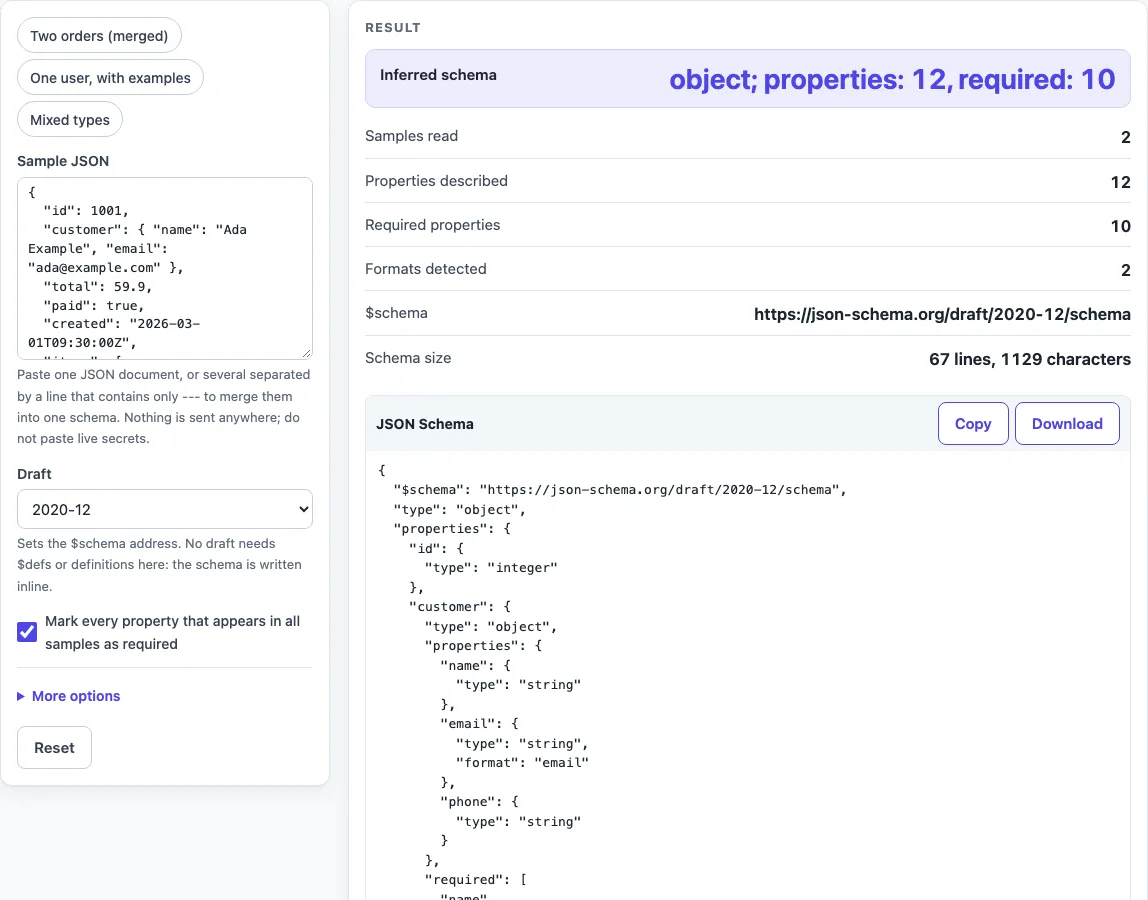
How to use the JSON Schema generator
- Paste one JSON document into the Sample JSON box. To describe several examples at once, put them in the same box and separate them with a line containing only
---. - If you want a ready-made example, choose one of the presets: Two orders (merged) (the default), One user, with examples, or Mixed types.
- Open the Draft select and choose 2020-12 (the default), 2019-09, draft-07 or draft-04.
- Leave Mark every property that appears in all samples as required ticked to get a required list. Untick it to leave required out.
- Under More options, choose whether to tick Detect string formats (date-time, date, email, uuid, uri, ipv4) (on by default), Forbid extra properties (additionalProperties: false) (off by default) and Add descriptions from sample values (examples) (off by default).
- Read the JSON Schema code block. Check the output rows, including Inferred schema, Samples read, Required properties and Formats detected. Open “How it was calculated” to see the rules used.
- Click Copy, or click Download to save the result as schema.json.
If the tool reports an error, it names the sample number, line and column of the first bad character. Fix that spot and the schema is inferred again from your corrected input.
How does it decide between integer and number?
Whole numbers become integer. If any value at that place has a decimal part, the type becomes number. The decision covers all samples together: a value of 1 in one sample and 1.5 in another gives number. JSON.parse reads 1.0 as 1, so 1.0 on its own gives integer.
JSON Schema defines integer as a number with a zero fractional part, so 1.5 needs number (section 6.1.1). For example, the samples {"id":1,"price":9.5} and {"id":2,"price":3,"tag":null} give id as integer, price as number and tag as type null.
Are properties required?
A property is required when it appears in every object merged at that place. The required list names those properties. A property that appears in only some samples is optional. With the first checkbox ticked, which is the default, the generator writes the required list. Unticking it leaves required out.
An empty required list is never written, because draft-04 requires at least one element in required (validation section 5.4.3.1). The schema describes only what the samples show. A property never seen is unknown to it, and a value type never seen is not allowed. Add more samples to find out which properties are optional.
What does it do with arrays and nested objects?
For an array, the generator merges the schemas of all its elements into one items schema, and an empty array gets no items. Nested objects are inferred the same way, one level at a time, and nesting deeper than 50 levels is cut with a warning. A value that is null in one sample and a string in another becomes a type list, and a mix that includes objects or arrays becomes anyOf.
Sources (checked 2026-10-15): JSON Schema specification.
Worked examples
| Input | Result |
|---|---|
| { "id": 1001, "customer": { "name": "Ada Example", "email... | object; properties: 12, required: 10 |
| { "id": "3f2504e0-4f89-41d3-9a0c-0305e82c3301", "username... | object; properties: 8, required: 8 |
| [1, 1.5, "two", null, true, [1, 2], {"a": 1}] | array; properties: 1, required: 1 |
| { "id": "3f2504e0-4f89-41d3-9a0c-0305e82c3301", "username... | object; properties: 8, required: 8 |
Calculated by the tool above; open it with the same values to see each step.
Frequently asked questions
How do I create a JSON Schema from a JSON file?
Open the file in a text editor, copy its contents and paste them into the Sample JSON box. The schema appears in the JSON Schema code block, and you can copy it or download it as schema.json.
Can it merge several JSON examples into one schema?
Yes. Separate the examples with a line containing only ---. The generator infers one schema that describes all of them, merging the properties found in each object.
Which draft should I use?
Use the draft that your validator supports. 2020-12 is the newest draft offered here, and draft-07 is widely supported. If you are unsure, check which draft your validator documents before you choose.
Is my JSON uploaded?
No. The tool runs in your browser, and nothing you paste is sent or stored. Test values are better than live production secrets, and any live secret pasted into any website should be treated as exposed.
Can it detect dates and emails?
Yes. It can write a format for date-time, date, email, uuid, uri and ipv4 when every string at that place matches. A format is written only if the chosen draft defines that name. A format is an annotation by default, so a validator may or may not enforce it.
Why is there no format for my date in draft-04?
draft-04 does not define the date format or uuid. Its formats are date-time, email, hostname, ipv4, ipv6 and uri (section 7.3). Choose draft-07, 2019-09 or 2020-12 if you need a date format.
Related tools
- JSON Schema validator: use it to check whether a JSON document matches a schema.
- JSON generator from a schema: use it to create sample JSON from a schema.
- JSON Schema validation in Python: use it when you need to check schemas in Python code.
- JSON Schema validation in Java: use it when you need to check schemas in Java code.
- OpenAPI validator: use it when your schema is part of an OpenAPI document.
- Base64 to JSON decoder: use it to read the text inside a Base64 value. Decoding only shows the text and does not verify it.