HMAC SHA256 Generator
Enter a message and a key to get its HMAC, or paste an expected signature to check it.
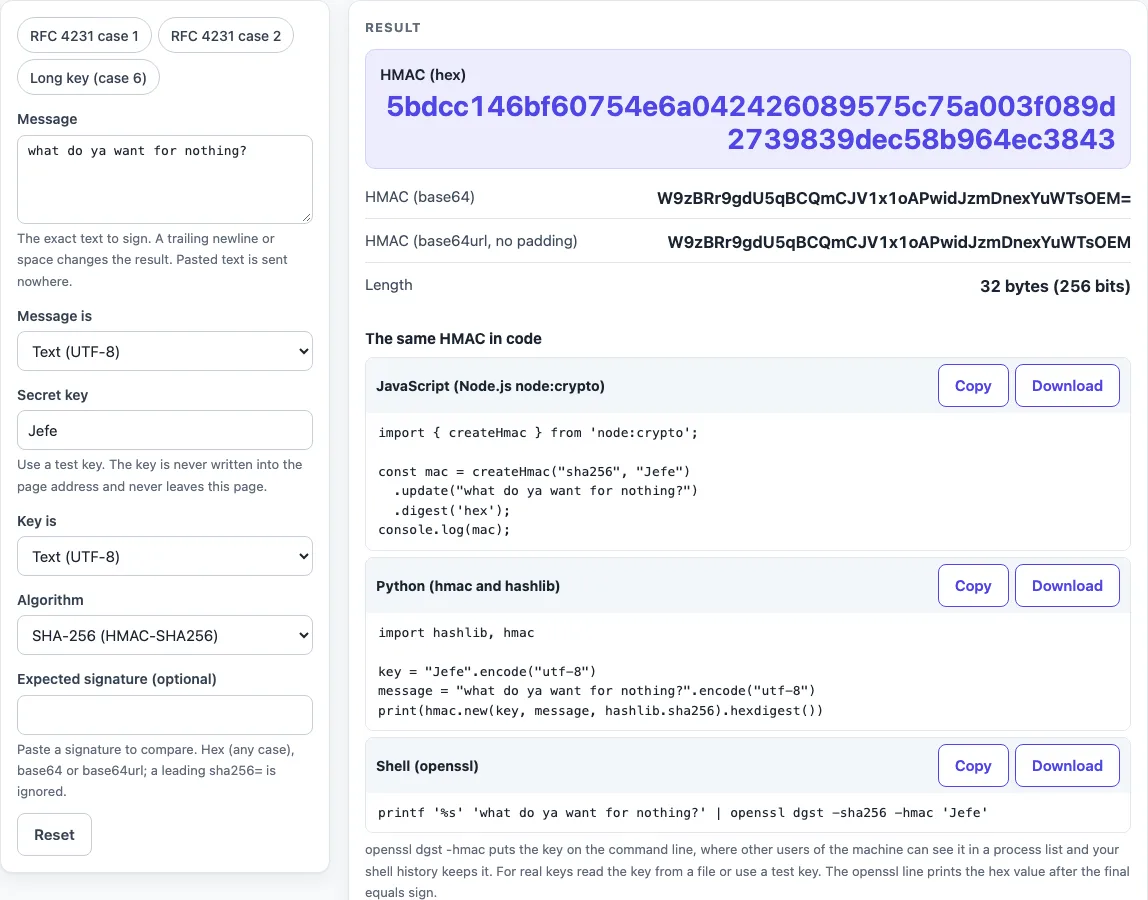
How to use the HMAC SHA256 generator
- Type or paste your text into Message. If your message is raw bytes, set Message is to “Hex bytes” instead of “Text (UTF-8)”.
- Type your key into Secret key. Set Key is to match how the key is written: “Text (UTF-8)”, “Hex bytes”, or “Base64 or base64url”.
- Leave Algorithm on SHA-256, the default, or choose SHA-1, SHA-384, SHA-512 or SHA-224.
- Read HMAC (hex), which is the primary output. HMAC (base64) and HMAC (base64url, no padding) show the same bytes in other forms. Length shows the byte size, such as “32 bytes (256 bits)” for SHA-256.
- Optional: paste the value you expect into Expected signature (optional). The result then shows “Matches” or “Does not match”.
- Open “The same HMAC in code” to copy the JavaScript, Python or Shell snippet for the same input.
The presets RFC 4231 case 1, RFC 4231 case 2 and Long key (case 6) fill in the inputs and also fill Expected signature with the RFC value, so the result should say “Matches”. Use them to confirm the tool works before you enter your own data. The key must not be empty, and a message longer than 1,000,000 characters is refused. An empty message is allowed, but the page shows a warning because it computes the HMAC of zero bytes.
What is HMAC SHA256?
HMAC SHA256 is a keyed hash: SHA-256 combined with a secret key by the HMAC construction defined in RFC 2104. The result is 32 bytes that show the sender knew the key and that the message was not changed.
The formula is HMAC(K, text) = H((K’ xor opad) || H((K’ xor ipad) || text)), where H is SHA-256. The key is first made the right size. For SHA-256 the block size B is 64 bytes, so K’ is the key padded with zero bytes up to 64. A key longer than B is hashed with H first, and the digest is used as the key. The inner value is the key XORed with ipad, which is the byte 0x36 repeated B times. The outer value is the key XORed with opad, which is the byte 0x5c repeated B times. The inner hash is computed first, and the outer hash is applied to the result.
For example, the default input (message “what do ya want for nothing?”, key “Jefe”) uses a 4-byte key, so the page pads it with 60 zero bytes. The final HMAC is 5bdcc146bf60754e6a042426089575c75a003f089d2739839dec58b964ec3843. RFC 2104 section 2 also gives a minimal recommended key length of L bytes, where L is the hash output length. For SHA-256 that is 32 bytes.
Is HMAC SHA256 encryption?
No. HMAC SHA256 does not encrypt anything, so the message stays readable. It only lets someone with the same key check that a message came from a holder of that key and was not changed. Because the key is shared, anyone who has it can create valid signatures, so the key must be kept secret. This page reproduces the RFC 4231 case 1, case 2 and case 6 values for SHA-256.
Sources (checked 2026-10-15): RFC 2104; RFC 4231; RFC 6194.
Worked examples
| Input | Result |
|---|---|
| SHA-256, key 0b0b0b0b0b0b0b0b0b0b0b0b0... (hex), message Hi There | b0344c61d8db38535ca8afce... |
| SHA-256, key Jefe (text), message what do ya want for nothing? | 5bdcc146bf60754e6a042426... |
| SHA-256, key aaaaaaaaaaaaaaaaaaaaaaaaa... (hex), message Test Using Larger Than Bl... | 60e431591ee0b67f0d8a26aa... |
| SHA-1, key test-secret (text), message {"id":"evt_1"} | 3cfe5f4886f2645cef58c34e... |
Calculated by the tool above; open it with the same values to see each step.
Frequently asked questions
How do I generate an HMAC SHA256 signature online?
Type your message into Message and your key into Secret key, keep Algorithm on SHA-256, and read HMAC (hex). That hex value is the signature. Nothing you type leaves the page.
How do I do HMAC SHA256 in Python, Node.js or Java?
In Python, use hmac.new(key, msg, hashlib.sha256).hexdigest() with bytes arguments. In Node.js, use createHmac('sha256', key).update(msg).digest('hex') from node:crypto. This page shows the Python and Node.js versions under “The same HMAC in code”. Java is not shown on this page.
Hex or base64: which one is the signature?
Both are the same 32 bytes written in two ways. Use the form the other side expects. The page’s Expected signature field accepts hex in any case, base64 or base64url, so you can paste whichever one you have.
My HMAC does not match the other system. What do I check?
Check these in order:
- Key encoding: a key given as hex or base64 must be entered as hex or base64, not as text, and the reverse is also true.
- Exact message bytes: a trailing newline changes the result.
echoadds one, whileprintf '%s'does not. Spaces and JSON formatting also count, so check whether the JSON was re-serialised before signing. - Algorithm: confirm the other side uses the same SHA variant.
- Output format: compare hex with base64 or base64url.
Can I use the same tool for HMAC-SHA1 or SHA512?
Yes. Choose SHA-1, SHA-224, SHA-384 or SHA-512 under Algorithm. When SHA-1 is selected, the page shows a warning quoting RFC 6194, which says it is not prudent to use SHA-1 when collision resistance is required. RFC 6194 section 3.3 also says there is no indication that attacks on SHA-1 can be extended to HMAC-SHA-1.
Is it safe to paste my production key?
Use a test key where you can. Any live production secret typed into any website should be treated as exposed, even though nothing is sent or stored by this page. The page does not put the key in the page address and masks it in the printed inputs, but that does not change the advice.
Related tools
- Webhook tester: use it when you need to inspect incoming requests before you work out how their signature was made.
- What is a webhook: read it if you are new to webhooks and want the background before you check a signature.
- SHA256 hash generator: use it when you need a plain SHA-256 digest with no key.
- curl to Python converter: use it to turn a curl command into Python code when you are reproducing a signed request.
- JWT validator: use it to look at a token’s parts, remembering that decoding is not verifying the signature.
- Unix timestamp converter: use it when a signed message includes a timestamp and you need to read its time.