Hex to Decimal
Type a hex, decimal, binary or octal number and get all four bases at once, the signed two's complement reading and the step-by-step working.
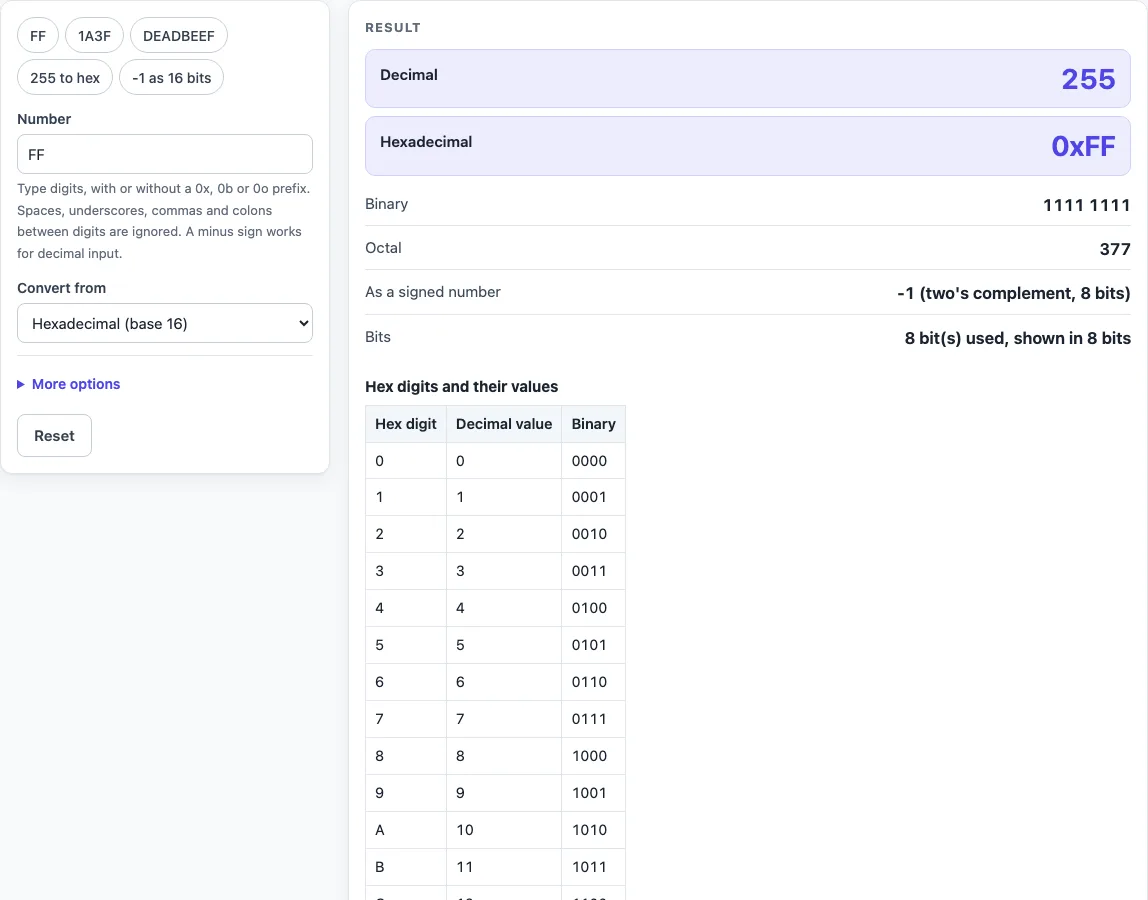
How to use the Hex to Decimal
- Click the Number box and type your value. The page opens on FF.
- Check Convert from. Leave it on Hexadecimal (base 16) for hex input, or choose Decimal (base 10), Binary (base 2) or Octal (base 8) if your number is in another base.
- For signed values, open More options and set Width for signed values to Auto, 8, 16, 32 or 64 bits.
- Read the result rows: Decimal, Hexadecimal (with 0x), Binary (grouped in fours), Octal, As a signed number and Bits.
- Scroll to How it was calculated to see the working. The table below it lists the 16 hex digits with their decimal and binary values.
- To try the examples, use the presets: FF, 1A3F, DEADBEEF, 255 to hex and -1 as 16 bits.
Try the presets first: FF gives 255, 1A3F gives 6719 and DEADBEEF gives 3735928559, so you can see how each row and the working look before you enter your own number. You can include 0x, 0b or 0o prefixes. Spaces, underscores, commas and colons between digits are ignored, so 0xDEAD_BEEF and DEADBEEF give the same result. A minus sign works only with decimal input. If your number is too long to read at a glance, paste it as it is: the box accepts up to 10,000 digits, and the Bits row tells you how many bits the value uses.
How do I convert hex to decimal?
Multiply each hex digit by a power of 16 and add the results. Each digit counts as its value (0 to 9, then A=10 to F=15) times 16 raised to its position, counted from the right starting at 16^0. For 1A3F, that is 1×16^3 + 10×16^2 + 3×16^1 + 15×16^0 = 4096 + 2560 + 48 + 15 = 6719.
How do I convert decimal to hex?
Divide the decimal number by 16 again and again, and write down each remainder. Remainders from 10 to 15 become A to F. Then read the remainders from last to first. For 255, 255 ÷ 16 = 15 remainder 15 (F), and 15 ÷ 16 = 0 remainder 15 (F), so 255 is FF. The same method gives 4096 as 1000 and 65535 as FFFF.
What is 0xFF in decimal?
0xFF is 255 in decimal. The 0x prefix tells you the digits are hexadecimal, and FF works out to 15×16 + 15 = 255. In binary, the same value is 11111111.
How does two’s complement work for signed hex?
Two’s complement is a way to show negative numbers using a fixed number of bits. A bit pattern U that is W bits wide means U − 2^W when its top bit is set, and just U otherwise. FF in 8 bits is 255 − 256 = -1, and FFFF in 16 bits is also -1. The pattern 8000 in 16 bits is -32768, and 7FFF is 32767. DEADBEEF in 32 bits is -559038737, while read as unsigned it is 3735928559.
What do the letters A to F mean in hex?
A to F are single symbols for the values 10 to 15, because hex needs sixteen symbols per digit and 0 to 9 only supply ten. A is 10, B is 11, C is 12, D is 13, E is 14 and F is 15. Upper and lower case mean the same thing, so ff and FF are equal.
How do I convert a negative decimal number to hex?
Enter the negative number as decimal input with a minus sign, and the tool shows its two’s complement pattern at the chosen width. To do it by hand, add 2^W to the number, where W is the bit width, then convert the result to hex. For example, -1 in 8 bits is 256 − 1 = 255, which is FF. -128 in 8 bits is 80, and -129 needs 16 bits, giving FF7F. If the width you choose is too small, the tool tells you how many bits are needed.
How big a hex number can this convert?
The conversion uses exact big integers, so long values keep every digit. A 32-digit value such as ffffffffffffffffffffffffffffffff gives exactly 340282366920938463463374607431768211455, which is 2^128 − 1. The input can run to 10,000 digits. Above 2^53, the tool warns that plain JavaScript numbers would round, so code that stores the value in a plain number may lose the last digits.
Worked examples
| Input | Result |
|---|---|
| FF (hexadecimal) | 255 = 0xFF |
| 1A3F (hexadecimal) | 6719 = 0x1A3F |
| DEADBEEF (hexadecimal) | 3735928559 = 0xDEADBEEF |
| 255 (decimal) | 255 = 0xFF |
| -1 (decimal) | -1 = 0xFFFF |
Calculated by the tool above; open it with the same values to see each step.
Frequently asked questions
Can I convert binary or octal numbers with this tool?
Yes. Change Convert from to Binary (base 2) or Octal (base 8). For example, 11111111 in binary is 255, which is FF in hex, and octal 777 is 511, which is 1FF.
Do I need to type the 0x prefix?
No. The tool opens on FF without a prefix. If you include 0x, 0b or 0o, the tool accepts it.
Why does the minus sign not work when I type hex?
A minus sign works only with decimal input. Set Convert from to Decimal (base 10), type the negative number, and read the value in As a signed number.
What does the Bits row show?
It shows how many bits the value uses and the width it is displayed in. For example, 255 entered as decimal is shown in 16 bits, because 8 bits cannot hold it as a signed value.
Does the tool send my numbers anywhere?
No. Everything runs in your browser, and nothing is uploaded or stored.
Why does the signed value differ from the decimal value?
The Decimal row treats the digits as an unsigned number. The signed row reads the same bit pattern as a two’s complement number of the chosen width, so FF is 255 unsigned but -1 as an 8-bit signed number.
Is there an official standard for this conversion?
No official standard defines it. It is positional notation arithmetic. The tool’s results were checked against Python’s int() and bit arithmetic.
Related tools
- Hex to ASCII Converter: use it when your hex bytes stand for text and you want to read the words.
- Base32 Decode and Encode: use it for Base32 strings rather than hex values.
- Base64 to JSON Decoder: use it when a Base64 string holds JSON data.
- Unix Timestamp Converter: use it when a number is a count of seconds since 1970 and you need the date.
- SHA-256 Hash Generator: use it to produce a SHA-256 hash, which is written as 64 hex characters.
- Encoding and hashing tools: use it to browse the other encoding and hashing tools in one place.