Hex to ASCII
Paste hex bytes, pick ASCII, UTF-8 or Latin-1, and read the decoded text, with control characters made visible and an optional byte-by-byte table.
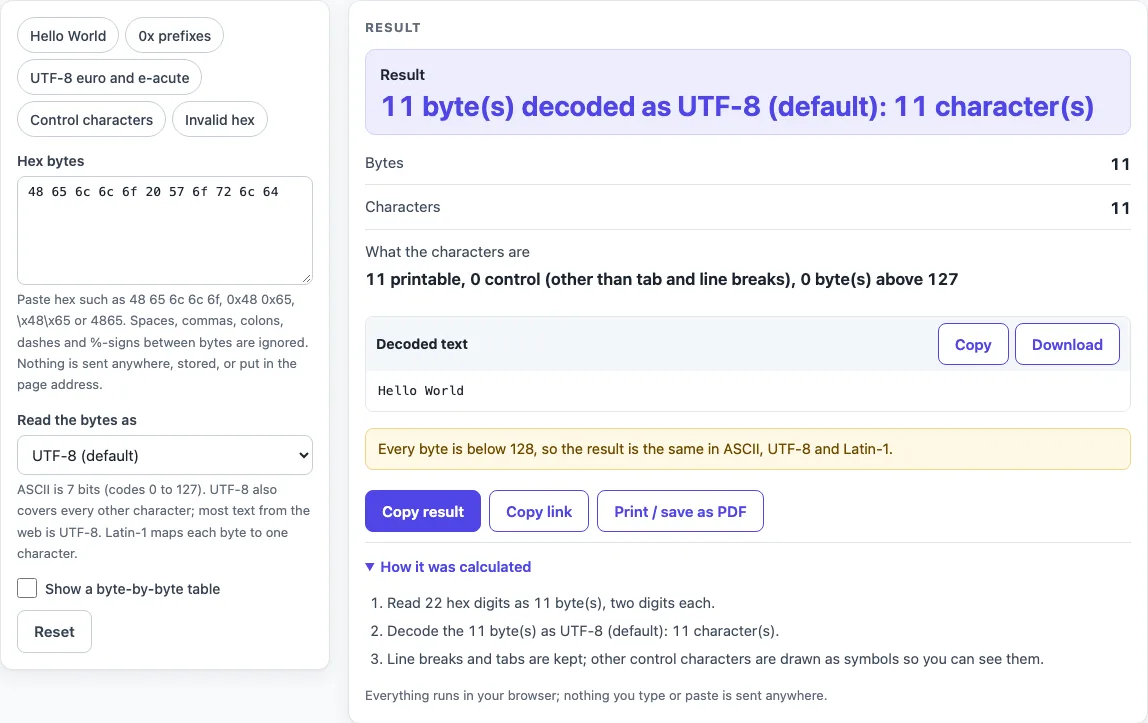
How to use the Hex to ASCII tool
- Click the Hex bytes box and paste your hex. Each byte is two digits from 00 to ff, in upper or lower case.
- Under Read the bytes as, keep UTF-8 for most data. Pick ASCII (7-bit) if you expect plain English text, or Latin-1 (ISO 8859-1) for older Western European text.
- Read the Result row. It shows how many bytes were decoded, the encoding used and how many characters you got.
- Check the Decoded text block. Click Copy to take the text or Download to save it.
- Tick Show a byte-by-byte table to see up to the first 256 bytes, each with its number, hex value, decimal value, binary value, character and ASCII name.
The box opens on 48 65 6c 6c 6f 20 57 6f 72 6c 64, so the first screen already shows Hello World. Use the presets (Hello World, 0x prefixes, UTF-8 euro and e-acute, Control characters and Invalid hex) to see how other inputs behave. If something is wrong, the error names the problem and gives the position of the first bad character. An odd number of digits, an empty box or a character that is not a hex digit each produce an error like this. Nothing you paste leaves your browser, so you can test with sample data first and then paste the real bytes.
How do I convert hex to ASCII text?
Each byte is written as two hexadecimal digits, a number from 00 to ff, which stands for a value from 0 to 255. ASCII gives the values 0 to 127 a fixed character, so you convert hex to text by looking up each byte in the ASCII table. For example, 48 is 72 in decimal, and 72 is the capital letter H.
Applying the same lookup to 48 65 6c 6c 6f gives H, e, l, l and o, which reads as Hello. The byte 20 is 32, the space character. Spaces, commas and the other separators only divide the bytes and carry no value of their own. Prefixes such as 0x and \x mark a hex number and are dropped before decoding.
What is the difference between ASCII and UTF-8?
ASCII is a 7-bit code with 128 positions, numbered 0 to 127, defined in RFC 20 (1969). It covers English letters, digits, punctuation, the space, and control characters such as NUL (0), LF (10, hex 0a) and DEL (127). It has no room for accented letters or symbols such as the euro sign.
UTF-8, defined in RFC 3629, can store far more characters. It writes each ASCII character as the same single byte, so text that is pure ASCII gives identical results in ASCII, UTF-8 and Latin-1. Other characters use two to four bytes. The first byte of such a sequence is in the range c2 to f4, and the following bytes are in the range 80 to bf.
Take e2 82 ac 20 c3 a9. Read as UTF-8, it is six bytes and three characters: the euro sign, a space and é (e with an acute accent). Read as Latin-1, the same six bytes become six unrelated characters, including an invisible control code and a capital A with tilde. This garbled result is called mojibake, and it means the bytes were read with the wrong encoding.
Latin-1 (ISO 8859-1) gives each byte the character with the same number, 0 to 255. Its values 0x80 to 0x9f are control codes, which is why they show as \x80-style text.
Sources (checked 2026-10-18): RFC 20; RFC 3629.
Worked examples
| Input | Result |
|---|---|
| 48 65 6c 6c 6f 20 57 6f 72 6c 64 (UTF-8 (default)) | "Hello World" |
| e2 82 ac 20 c3 a9 (UTF-8 (default)) | "€ é" |
| e2 82 ac 20 c3 a9 (Latin-1 (ISO 8859-1)) | "â\\x82¬ é" |
| 48 69 0a 00 7f 21 (ASCII (7-bit)) | "Hi\n␀␡!" |
Calculated by the tool above; open it with the same values to see each step.
Frequently asked questions
Why does my hex show strange characters?
Strange characters usually mean the bytes were written in one encoding and are being read as another. Try switching between UTF-8, ASCII and Latin-1 under Read the bytes as. If the bytes are not valid UTF-8, the tool shows the replacement character at the first bad byte and reports its number.
What do 0x48 0x65 0x6c 0x6c 0x6f mean?
They are five bytes, each written with a 0x prefix, which is a common way to mark a hexadecimal number. Their decimal values are 72, 101, 108, 108 and 111, which ASCII reads as H, e, l, l and o. Together they spell Hello.
What are ASCII control characters like NUL and LF?
Control characters are codes 0 to 31 and 127 that do not print as letters or symbols. NUL (0) is often used to end a string, LF (10, hex 0a) starts a new line, and DEL (127) is the delete code. The tool keeps line breaks and tabs and draws other control characters as visible symbols so you can see them.
Is the hex I paste sent to a server?
No. Everything runs in your browser, so the hex you paste is never uploaded, stored or put in the page address. Shared links do not contain it.
Which separators and prefixes can I use?
You can write 48 65, 0x48,0x65, \x48\x65, %48%65, 48:65 or 4865, and all of them give the same two bytes. The separators are space, comma, semicolon, colon, dash and pipe. If a group between separators has an odd number of digits, the digits are joined across the gap and the tool warns you.
Why does ASCII mode show a replacement character?
ASCII has no meaning for bytes above 127, so the tool shows the replacement character for each of them and warns you with the count. Switch to UTF-8 or Latin-1 if the data contains accented letters or symbols.
Related tools
- Hex to Decimal Converter: use it when you need the plain number value of hex digits rather than the text they spell.
- Base32 Decode and Encode: use it when your encoded data uses the Base32 alphabet instead of hex.
- Base64url Encode and Decode: use it when your data is in URL-safe Base64 and needs to be decoded or encoded.
- SHA-256 Hash Generator: use it when you want to create a SHA-256 hash, which is usually shown as hex.
- Encoding and hashing tools: use it when you want to compare the different encoding and hashing options in one place.
- Unix Timestamp Converter: use it when a number is a count of seconds since 1970 and you need the date.