Generate JSON from a JSON Schema
Paste a schema to get sample JSON that matches it, the same every time for the same seed.
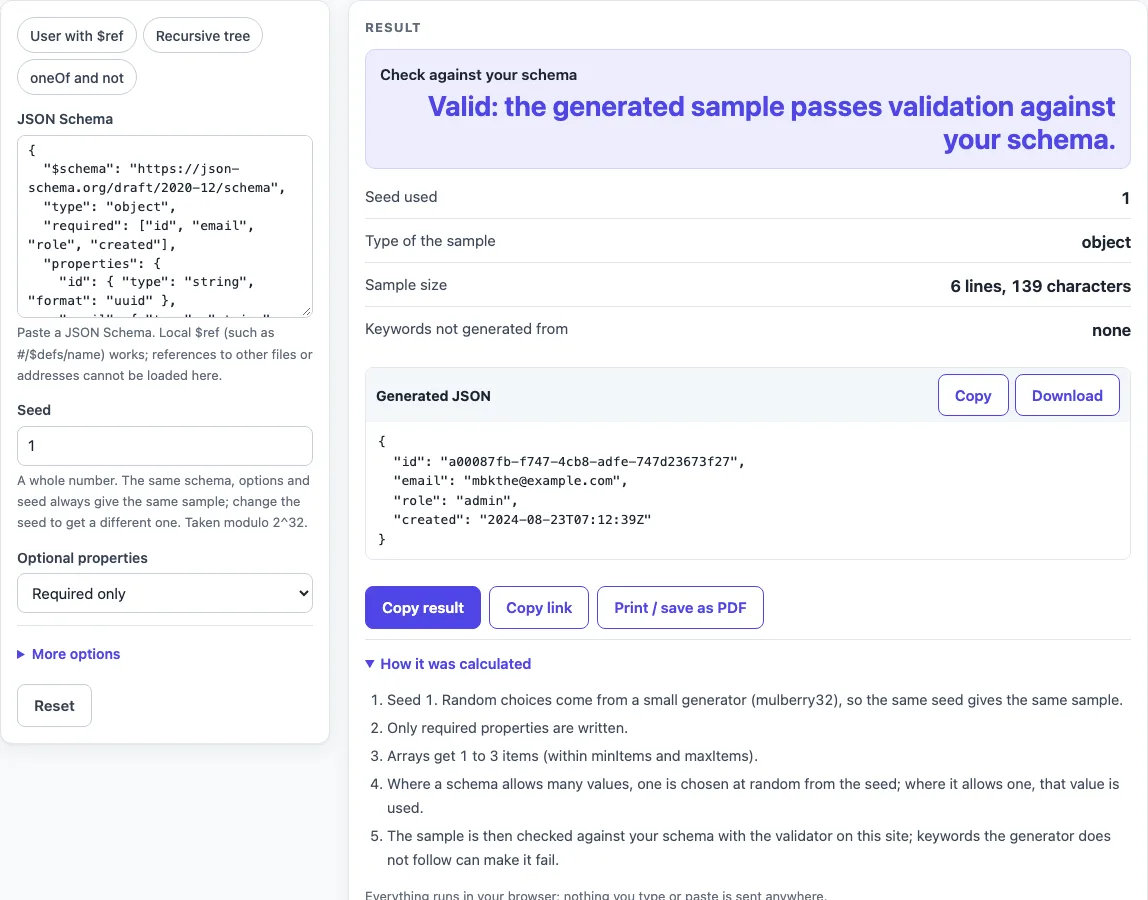
How to use the JSON Generator from Schema
- Paste your schema into the JSON Schema box, or choose a preset: User with $ref (the default), Recursive tree, or oneOf and not.
- Set Seed to a whole number. The default is 1. Keep the same seed to get the same output again.
- Under Optional properties, choose Required only (the default) for the smallest valid document, or Include all properties for the full shape.
- Open More options and set Array length: Small (up to 3) (the default), Minimum (minItems, or 0), or Use minItems..maxItems randomly. Turn on Use examples and defaults when present if you want your own values used.
- Read the sample in the Generated JSON block. Click Copy, or click Download as sample.json.
- Check the rows below the output: Check against your schema, Seed used, Type of the sample, Sample size, and Keywords not generated from. If any keywords were not followed, the table Keywords and cases that were not honoured shows where and what happened.
The schema is processed in your browser, and the page address does not carry it. Do not paste live production secrets into any website. Treat any pasted live secret as exposed, and use test values instead. Use Copy result, Copy link or Print / save as PDF to keep the result, and Reset to return to the sample.
How do I generate JSON from a JSON Schema?
The page builds one value for each part of the schema, following a fixed order of preference. A const value is used first. If Use examples and defaults when present is on, default comes next, then examples[0]. After that, enum supplies one member chosen at random, and otherwise the value is built from its type. If the schema has a type list, the first non-null type is used. If there is no type, one is inferred from the keywords present: properties means object, items means array, minLength, pattern or format means string, and minimum means number. A schema that says nothing, such as {} or true, gives null.
Numbers respect minimum, maximum, exclusiveMinimum and exclusiveMaximum (including the draft-04 boolean form), and multipleOf. With no bounds, a number falls between 0 and 100. Integers are whole, and other numbers are rounded to 2 decimals. If no number fits, the nearest bound is written and a note says so.
Strings follow minLength and maxLength, with a default length of 8 random lowercase letters. The format keyword produces uuid (the version 4 shape from RFC 4122), date-time, date, time, email (name@example.com), uri or ipv4. Other formats are listed as not generated.
Objects write required properties under Required only, or every listed property under Include all properties. Arrays follow the Array length setting. allOf is merged into one schema. For oneOf and anyOf, the first branch whose sample validates is used. For if/then/else, a sample is generated, tested against if, and then regenerated with then or else. Keywords the generator cannot solve, such as not, contains and patternProperties, are listed rather than silently ignored.
Is the output random?
Yes, but in a repeatable way. The output comes from a seeded generator, so the same schema, options and seed always produce the same document. Random choices come from mulberry32, a 32-bit generator by Tommy Ettinger, and the seed is taken modulo 2^32.
Change the seed to get a different sample. With the default preset, Required only and seed 1, the output is:
{"id":"a00087fb-f747-4cb8-adfe-747d23673f27","email":"mbkthe@example.com","role":"admin","created":"2024-08-23T07:12:39Z"}
The first two values for seed 1 are 0.6270739405881613 and 0.002735721180215478, checked against an independent Python port. Because the output is stable, a fixed seed suits test fixtures. Use a new seed when you want variety.
Sources (checked 2026-10-15): JSON Schema specification; RFC 4122.
Worked examples
| Input | Result |
|---|---|
| { "$schema": "https://json-schema.org/draft/202... (seed 1) | object, 139 characters |
| { "$schema": "https://json-schema.org/draft/202... (seed 42) | object, 303 characters |
| { "type": "object", "required": ["name"], "prop... (seed 1) | object, 690 characters |
| { "type": "object", "required": ["kind", "value... (seed 1) | object, 82 characters |
Calculated by the tool above; open it with the same values to see each step.
Frequently asked questions
Does it handle $ref?
Local references do work: #, #/pointer, and #anchor. The same $ref may be opened up to 3 times. Deeper than that, the minimum value is written and a note is added. References to other files or addresses are never loaded, so they become null with a note.
What about pattern?
Only a small subset of regular expressions is generated: literals, ., \d, \w, classes like [a-z] (no negation), groups with alternation such as (a|b), and the quantifiers *, +, ?, {n}, {n,} and {n,m}. The result is tested with the real RegExp. Any other pattern falls back to a plain string, and pattern is listed under Keywords not generated from.
Can I get optional fields too?
Yes. Choose Include all properties under Optional properties. It writes every listed property and shows the full shape. Required only shows the smallest valid document.
How many array items?
Use Array length. Small (up to 3) gives 1 to 3 items, kept within minItems and maxItems. Minimum (minItems, or 0) uses minItems, or 0 if it is not set. Use minItems..maxItems randomly picks a count between the two, using minItems + 5 if maxItems is not set. The count is capped at 100 items.
Does the sample always validate?
No. The page checks the sample against your schema with its own validator, with format checking on. The Check against your schema row shows either “Valid” or “Not valid” with the number of failed checks, and lists the first 5 errors. Keywords the page does not follow can lead to “Not valid”. For oneOf, a sample can match two branches and fail, and the check line shows that too.
Can I use my own examples?
Yes. Turn on Use examples and defaults when present. The page then uses your default and examples[0] values before it falls back to enum or type. The option is off by default.
Related tools
- JSON Schema validator: use it to check a JSON document against a schema you already have.
- JSON Schema generator: use it when you need to create a schema rather than generate data from one.
- JSON Schema validation in Python: use it when you want to run schema checks in Python code.
- JSON Schema validation in Java: use it when your project validates JSON in Java.
- OpenAPI validator: use it to check API descriptions and their schemas.
- Base64 to JSON decoder: use it to read a Base64-encoded JSON value as text. Decoding does not verify the value, so check any signature separately.