Decode Token
Paste a token or an Authorization header to see what is inside it.
To decode a token, paste it into the “Token or header” box. This token decoder works out what kind of input it is and decodes whatever can be decoded.
It handles JWTs, “Authorization: Bearer” and “Authorization: Basic” lines, Base64 and hex strings, encrypted JWEs, and token responses in JSON. Use it to decode a bearer token, an access token, an ID token or any other JSON web token. If the token is a JWT, the page also shows its algorithm, claims and expiry status, and for opaque tokens it explains why nothing can be read.
The tool runs in your browser. It is free, with no sign-up and no account.
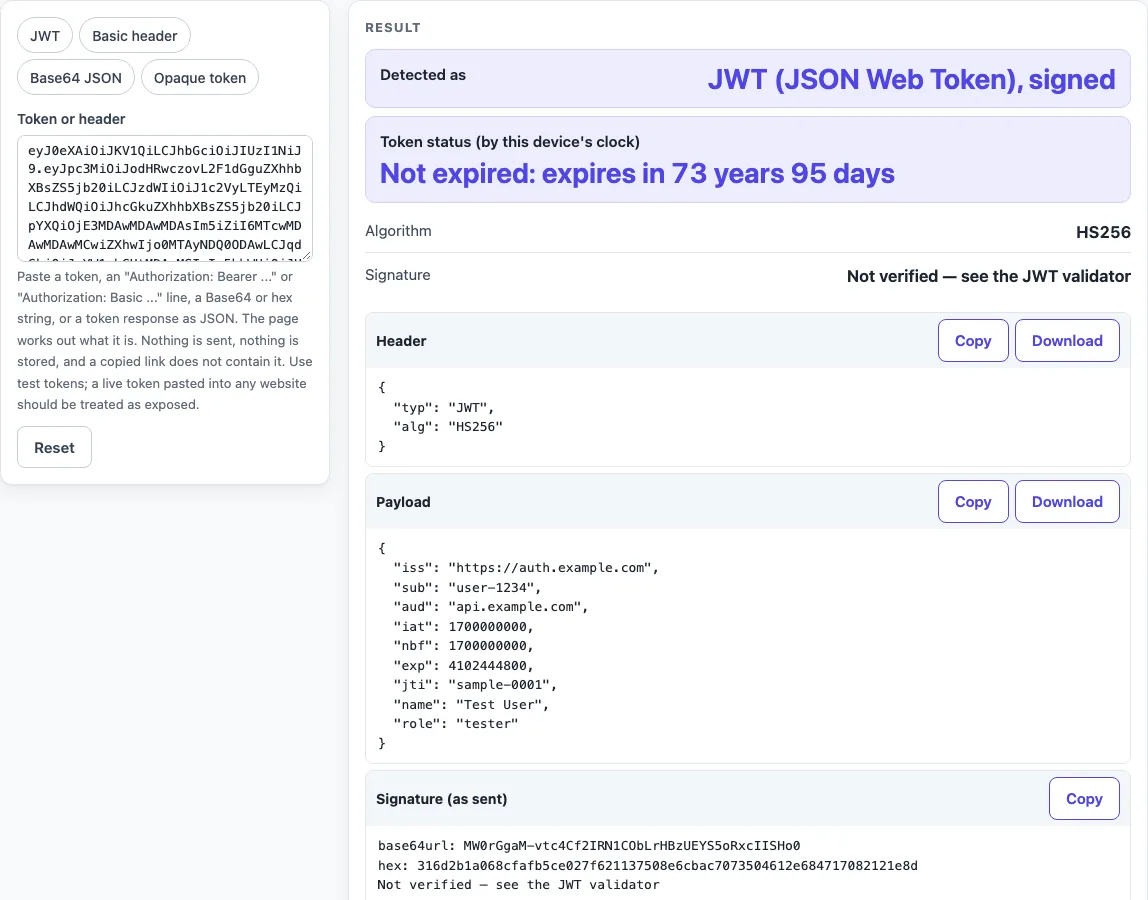
How to use the token decoder
- Copy the token you want to read. This can be a bare token, a full “Authorization: Bearer …” or “Authorization: Basic …” line, or a token response in JSON.
- Paste it into the “Token or header” box. You do not need to pick a format. Quotes and an “Authorization:” label are removed automatically.
- Read “Detected as” first. When you pasted a header or JSON, “Found in” shows where the token came from.
- For a JWT, check “Token status (by this device’s clock)”, then “Algorithm”. Read the Header and Payload blocks. “Signature” will say “Not verified — see the JWT validator”.
- For Basic credentials, read “Username” and “Password”. The password is shown in clear text, with a warning.
- For Base64 or hex input, check “Encoding” and “Decoded content”.
- For an opaque token, read “Size” and “What this means”.
- To see each output type, choose a preset: “JWT” (the default), “Basic header”, “Base64 JSON”, or “Opaque token”.
The presets fill the box with examples, so you can test the tool before using your own value. The token field is never put into the page address, so a link to this page does not carry what you pasted. Use Copy result, Copy link or Print / save as PDF to keep the result, and Reset to return to the sample.
How do I decode an access token?
An access token with three dot-separated parts is probably a JWT. Paste it into the box, and its header and payload will be readable. If the token has no dots and looks random, it is probably opaque, and its contents cannot be decoded here.
The tool treats a string as a JWT when its first part decodes to a JSON object. Each part of a JWT is Base64url-encoded. Base64url replaces + and / with - and _, and usually drops the = padding (RFC 4648 section 5).
A bearer token is a security token that any party holding it can use. The Authorization header carries it as “Bearer
Why can I read a JWT without a key?
A JWT’s header and payload are encoded, not encrypted, so anyone who has the token can decode them. No key is needed to read them. The signature protects the token against changes, not against being read. This is why a decoded payload is useful for learning what a token says, even before you have checked it.
Base64 and hex are encodings, not encryption, so they hide nothing. For example, this Base64 string decodes to a JSON object:
eyJ1c2VyIjoidGVzdCIsImlkIjo0Miwicm9sZXMiOlsiYWRtaW4iLCJ1c2VyIl19
The tool shows it as “Base64 text that contains JSON”, pretty-printed as {“user”:“test”,“id”:42,“roles”:[“admin”,“user”]}.
Sources (checked 2026-10-15): RFC 6750; RFC 7617; RFC 7662; RFC 4648; RFC 7519.
Worked examples
| Input | Result |
|---|---|
| eyJ0eXAiOiJKV1QiLCJhbGciOiJIUzI1NiJ9.... | JWT (JSON Web Token), signed |
| Authorization: Basic QWxhZGRpbjpvcGVu... | HTTP Basic credentials (user:password in Base64) |
| eyJ1c2VyIjoidGVzdCIsImlkIjo0Miwicm9sZ... | Base64 text that contains JSON |
| Authorization: Bearer mF_9.B5f-4.1JqM | Opaque token (no readable content) |
Calculated by the tool above; open it with the same values to see each step.
Frequently asked questions
Can I decode a bearer token?
Yes, if the bearer token is a JWT or another readable form. Paste the whole “Authorization: Bearer …” line, and the tool strips the header and decodes the token inside it.
What does “opaque token” mean?
An opaque token is a random reference with no readable content. The issuing server looks it up to find what it means. The tool shows its “Size” and explains “What this means”, but cannot decode it.
What is a Basic auth header?
A Basic auth header is “Basic " followed by Base64 of username:password (RFC 7617). Decoding it shows both values. Paste it into the box, or use the Basic header preset to see an example.
Is decoding the same as verifying?
No. Decoding only reads the token’s text. A decoded token is only text until its signature is checked, so a readable result does not prove that a token is genuine or that an API or payload is acceptable. Use the JWT validator to check the signature.
My token has 5 parts; why can’t I read it?
A token with five parts is usually an encrypted JWE. Only its protected header is readable. The tool shows the “Algorithm” and the Header block, and “What this means” explains that the payload needs a key to read.
Is it safe to paste my token?
The page sends nothing over the network and stores nothing. Even so, treat any live production secret pasted into any website as exposed. Test values are the better choice for practice.
Related tools
- Basic auth decoder: use it when you have a Basic header and want to see the username and password only.
- JWT decoder: use it when you want to read the header and payload of a JWT.
- Base64 to JSON decoder: use it when you have Base64 text that contains JSON.
- Base64url encoder and decoder: use it when you need to convert between Base64 and Base64url.
- curl to Python converter: use it when you want to turn a curl request that carries a token into Python code.
- JWT validator: use it when you need to check a JWT’s signature after decoding it.