curl to Python Converter
Paste a curl command to get the same request as Python code.
request.py file. The rows above the code list the method, URL, headers and body that were read, so you can check them before you run anything.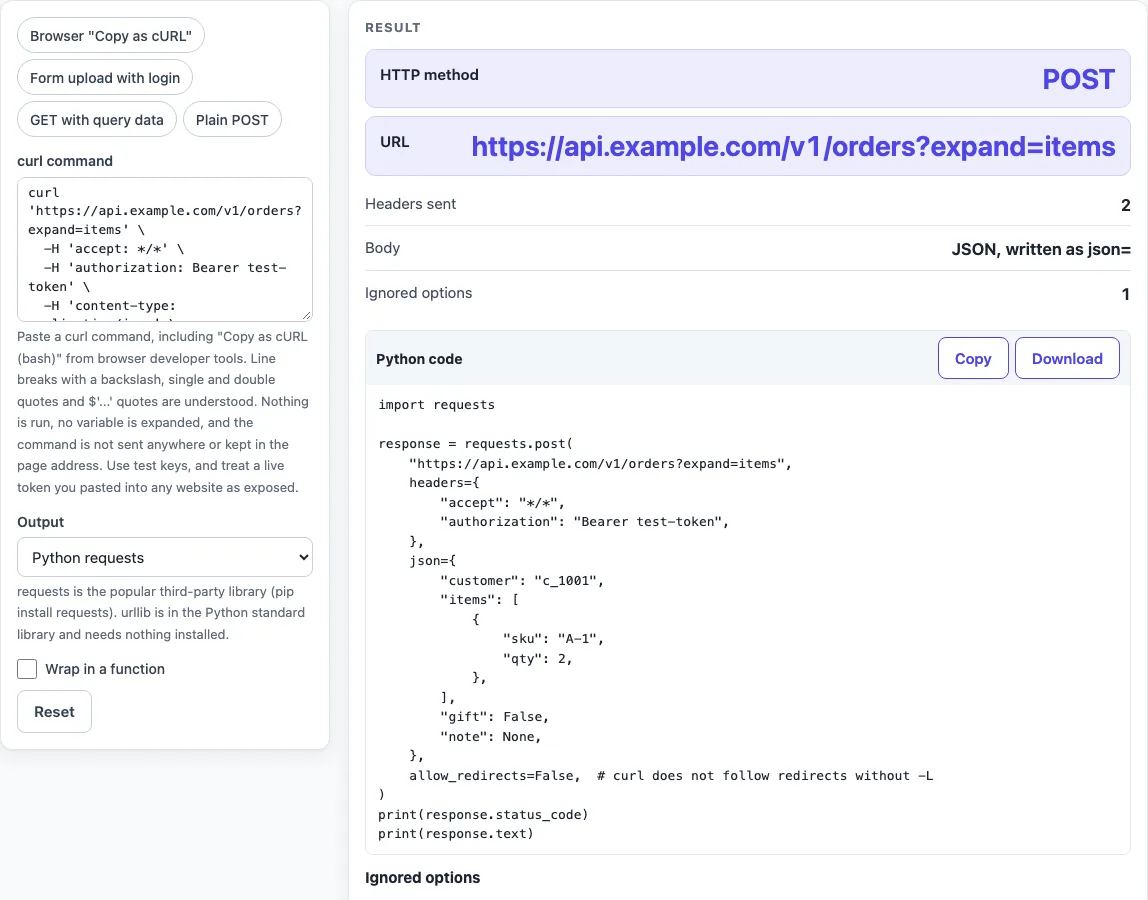
How to use the curl to Python converter
- Paste your curl command into the curl command field. The field is a secret field, so its text is not written to the page address and is masked in the printed inputs.
- Choose an Output: “Python requests” (the default) or “Python urllib (standard library)”.
- Optional: tick Wrap in a function to place the call inside
send_request()with anif __name__ == "__main__":block. - To start from a sample, pick a preset: Browser “Copy as cURL” (the default), Form upload with login, GET with query data, or Plain POST.
- Read the result rows: HTTP method, URL, Headers sent, and Body. If they appear, also check Ignored options and Not supported, which list each option with a reason.
- Copy the code from the Python code block, or select Download as request.py.
The tool reads commands up to 1,000,000 characters and cuts longer input with a warning. Shell variables such as $TOKEN are not expanded, so replace them with real values before you paste. Use Copy result to copy the numbers as text, Copy link to copy a web address that reopens the tool with your non-secret settings, and Print / save as PDF to keep a record. Reset returns the tool to its starting sample.
How do I convert a curl command to Python?
Paste the command into curl command and choose an Output. The Python code block then contains code that sends the same method, URL, headers and body. The rows above the code show what was read, so you can check it before you run anything.
How do I send JSON in requests?
Pass the body with the json= parameter, and requests sets Content-Type to application/json for you. The tool uses json= when the command’s Content-Type is application/json and the body is valid JSON, converting the JSON literals true, false and null to Python’s True, False and None. If the command also uses data= or files, requests ignores json=.
What does -d do?
-d sends the body with the POST method, in the same way a browser does. Several -d pieces are joined with &. -d @file removes carriage returns, newlines and null bytes from the file, while --data-binary @file sends the file unchanged. Unless you set a Content-Type, -d adds application/x-www-form-urlencoded. With -G, the data goes to the query string instead.
How do I upload a file with requests (curl -F)?
Each -F field becomes an entry in files=, such as files={"name": ("file.pdf", open("file.pdf", "rb"), "type")}. The ;type= and ;filename= parts are used when present, and the file is opened in binary mode. The tool does not guess the content type of an uploaded file. The urllib output does not support -F.
How do I do basic auth (curl -u)?
-u user:pass becomes auth=("user", "pass") in requests. In urllib, the code builds a Basic Authorization header with base64. If the command has no password, the tool uses an empty password and shows a warning.
Does curl follow redirects?
curl does not follow redirects unless you give -L. requests follows them by default, so without -L the code sets allow_redirects=False. For HEAD requests, requests already does not follow redirects. The urllib output blocks redirects with a small handler.
Can I convert curl to Python without installing requests?
Yes. Choose Output “Python urllib (standard library)”, which uses only Python’s standard library. Keep in mind that urllib does not support -F, and JSON bodies are written with json.dumps(...) while the header is kept.
Is it safe to paste a curl command with a token?
The tool runs in your browser. Nothing you paste is sent or stored, and nothing is run or sent from the page. That does not make it safe for production: treat any live production secret pasted into any website as exposed, and use test values where you can.
Sources (checked 2026-10-15): curl manual; Requests documentation.
Worked examples
| Input | Result |
|---|---|
| curl 'https://api.example.com/v1/orders?expand=items' -H 'accept: *... | POST request, 23 lines of requests code |
| curl -X POST https://api.example.com/upload -u demo:test-password -... | POST request, 13 lines of requests code |
| curl -G https://api.example.com/search -d q=blue\ shoes -d page=2 -... | GET request, 16 lines of urllib code |
Calculated by the tool above; open it with the same values to see each step.
Frequently asked questions
Can this tool write pycurl code?
No. The Output choices are “Python requests” and “Python urllib (standard library)”. pycurl is a separate Python library that wraps libcurl, so you would set its options yourself using the method, URL, headers and body shown in the result rows.
How do I get the status and body with the requests output?
Use the response object that the requests call returns. Its .status_code holds the HTTP status and its .text holds the body as text.
Will the Python code behave exactly like my curl command?
Not always. The page cannot make Python and curl identical: default headers such as User-Agent, Accept-Encoding and Connection differ, and re-serialised JSON can differ in spacing.
Which options are not supported?
Options such as -T upload, --retry*, client certificates and TLS settings, and digest or NTLM auth are listed under Not supported, with a reason for each. A pipe or other shell operator also ends the command.
How do I add headers and cookies?
Keep your -H options and your -b cookie option in the curl command. They become headers= and cookies= in the requests output. The Headers sent row lists what was read, so you can see each header before you run the code.
Does the tool run my curl command?
No. It only reads the text and writes Python code. Nothing is run, fetched or sent, and shell variables are not expanded.
Related tools
- Webhook tester: use it when you are working with webhook requests and want to test a payload.
- What is a webhook: read this to understand what a webhook is before you test one.
- HMAC SHA256 generator: use it when you need an HMAC SHA256 value for a signed request.
- SHA256 hash generator: use it when you need a plain SHA256 hash of some text.
- JWT validator: use it to decode a JWT and see its contents, remembering that decoding is not verifying.
- Unix timestamp converter: use it when a request or response contains a Unix timestamp you need to read as a date.