Basic Auth Decode and Encode
Decode a Basic Authorization header, or build one from a username and password.
Basic auth decode: this free tool reads an HTTP Basic Authorization header and shows the username and password hidden inside it. It can also build a new header from a username and password, along with a curl command that uses it. Basic authentication is defined in RFC 7617, and the header carries only Base64 text, so decoding it needs no key.
The tool runs entirely in your browser. It makes no network request, nothing is stored, and there is no sign-up or account. You can paste a header or a Base64 value to decode it, or type credentials to build one. The decoded password appears on screen in clear text, so use test values where you can.
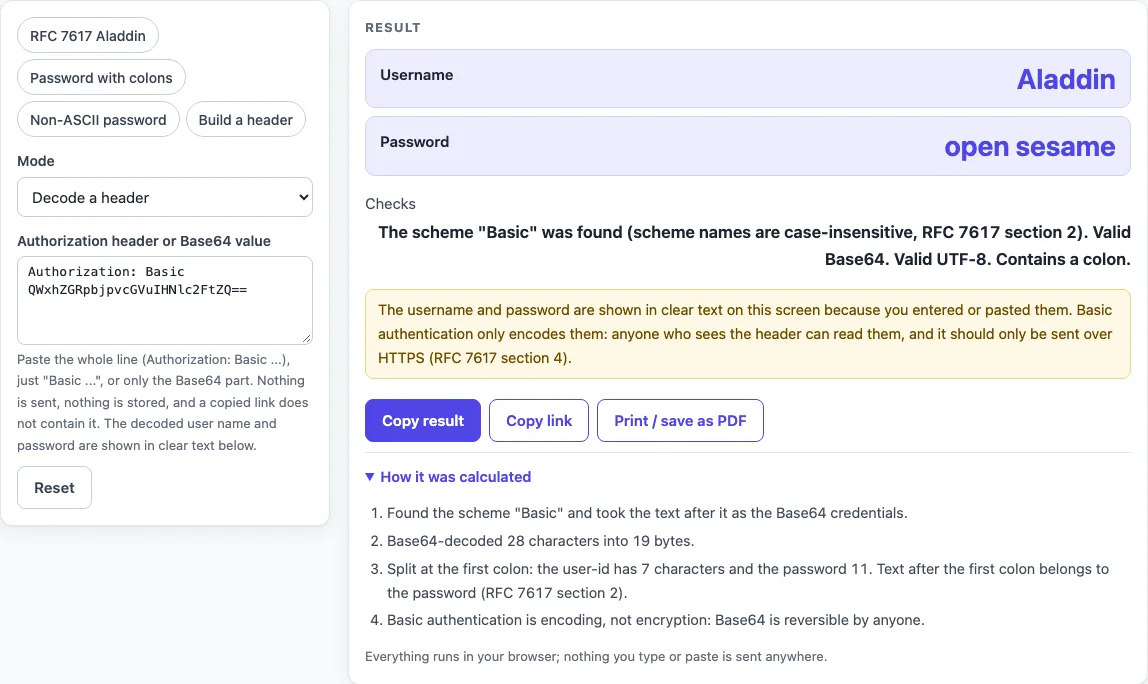
How to use the Basic auth decoder
To decode a header:
- Set “Mode” to “Decode a header”.
- Paste the whole line (such as “Authorization: Basic …”), the part starting with “Basic”, or only the Base64 value into the secret field “Authorization header or Base64 value”. Quotes and line breaks are removed for you.
- Read “Username” and “Password”. The password is shown in clear text, with a warning.
- Read the “Checks” line. It reports whether the scheme was found, whether the Base64 is valid, whether the bytes are valid UTF-8, and whether a colon is present.
To build a header:
- Set “Mode” to “Build a header”.
- Type your values into “Username” and “Password” (secret field).
- Read “Authorization header”, “curl option -u”, “curl command”, “curl with the header instead”, “Base64 credentials” and “Bytes before Base64 (UTF-8)”.
The presets fill the fields for you. “RFC 7617 Aladdin” is the default, and “Password with colons”, “Non-ASCII password” and “Build a header” are the others. Secret fields are never put in the page address, so the values you enter are not carried in a copied link. Use Copy result to copy the numbers as text, Copy link to copy a web address that reopens the tool with your non-secret settings, and Print / save as PDF to keep a record. Reset returns the tool to its starting sample.
How do I decode a Basic auth header?
Remove the word “Basic” and the space after it, Base64-decode the rest, then split the result at the first colon. The text on the left is the username and the text on the right is the password. The scheme name is matched without regard to case, as RFC 7617 section 2 allows.
For “Authorization: Basic QWxhZGRpbjpvcGVuIHNlc2FtZQ==”, the decoded text is “Aladdin:open sesame”, so the username is “Aladdin” and the password is “open sesame”. Text after the first colon always belongs to the password. “Basic dXNlcjpwYTpzczp3b3Jk” decodes to the username “user” and the password “pa:ss:word”.
How do I make a Basic auth header?
Join the username, a colon and the password, encode that text as UTF-8, Base64-encode the resulting bytes, and put “Authorization: Basic " in front. The Base64 uses the standard alphabet with padding.
For the username “Aladdin” and the password “open sesame”, the header is “Authorization: Basic QWxhZGRpbjpvcGVuIHNlc2FtZQ==”. This is the example from RFC 7617, and curl sends the same header for -u 'Aladdin:open sesame'.
Can a username contain a colon?
No. RFC 7617 section 2 says the first colon separates the user-id from the password, so a user-id containing a colon cannot be encoded. The tool reports an error in Build mode if the username has a colon. A password can contain colons, because everything after the first colon belongs to it. Build with username “üser” and password “pässwörd:1” gives the header “Authorization: Basic w7xzZXI6cMOkc3N3w7ZyZDox”.
Why does my non-English password fail?
The server may expect a different character encoding from the one used to build the header. RFC 7617 section 2 leaves the default encoding open, and section 2.1 lets a server announce charset=“UTF-8”, which means NFC-normalized text encoded as UTF-8. This tool always encodes as UTF-8 and decodes UTF-8 first, falling back to ISO-8859-1. When decoding falls back, the “Checks” line says “Not valid UTF-8 (read as ISO-8859-1)”.
Take user “test” and password “123” followed by the pound sign (U+00A3). Its UTF-8 bytes are 74 65 73 74 3A 31 32 33 C2 A3, which Base64-encodes to “dGVzdDoxMjPCow==”. If your password is not in NFC form, the tool shows a warning.
Sources (checked 2026-10-15): RFC 7617; curl manual.
Worked examples
| Input | Result |
|---|---|
| Authorization: Basic QWxhZGRpbjpvcGVuIHNlc2FtZQ== | user Aladdin, password open sesame |
| Basic dXNlcjpwYTpzczp3b3Jk | user user, password pa:ss:word |
| Authorization: Basic dGVzdDoxMjPCow== | user test, password 123£ |
| Aladdin / open sesame | Authorization: Basic QWxhZGRpbjpvcGVuIHNlc2FtZQ== |
Calculated by the tool above; open it with the same values to see each step.
Frequently asked questions
Is Basic auth encrypted?
No. Base64 is an encoding, and anyone who sees the header can reverse it. RFC 7617 section 4 says Basic “SHOULD NOT be used (without enhancements such as HTTPS)”, so use it only over HTTPS.
What is the curl option for Basic auth?
Use -u user:password, for example curl -u 'Aladdin:open sesame', which sends the same header as the RFC example. Basic is curl’s default, and --basic selects it explicitly. The curl manual advises reading sensitive data from a file rather than typing it on a command line, because on some systems the argument can appear in process lists.
Is it safe to paste my credentials?
The page sends nothing and stores nothing, and the password is shown on screen because you typed or pasted it. That does not make a secret safe to use in production. Use test credentials. Any live production secret pasted into any website should be treated as exposed.
What about Bearer tokens?
A Bearer token is not Base64 of “user:password”, so this decoder shows an error saying the scheme is not Basic. Use the token decoder for it. Decoding only shows the text inside a token, and a decoded token is not trusted until its signature is checked.
Related tools
- Token decoder: use it when the header is a Bearer or other token rather than Basic.
- JWT decoder: use it to read the parts of a JSON Web Token.
- JWT validator: use it to check a JSON Web Token’s claims and signature.
- Base64 to JSON decoder: use it when a Base64 value holds JSON text.
- Base64url encoder and decoder: use it for the URL-safe Base64 alphabet, which Basic headers do not use.
- curl to Python converter: use it to turn a curl command that uses
-uinto Python code.