Base64url Encode and Decode
Encode or decode URL-safe Base64 and see the standard form next to it.
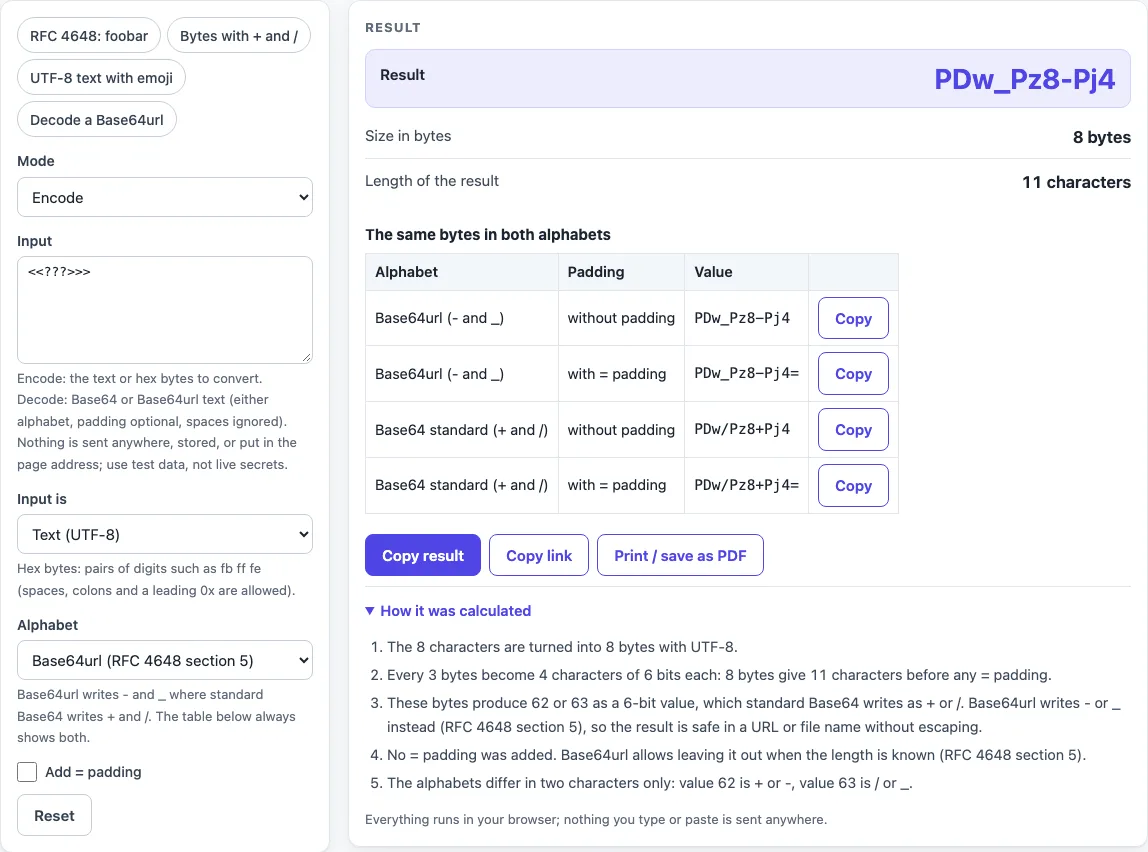
How to use the Base64url encoder and decoder
- Set “Mode” to Encode (the default), or to Decode to read a Base64url or Base64 string.
- Paste your text into “Input”. For raw bytes, set “Input is” to Hex bytes and enter pairs of digits such as
fb ff fe. Spaces, colons, commas and a leading 0x are allowed. - Leave “Alphabet” on Base64url (RFC 4648 section 5) for URL-safe output, or choose Base64 standard (RFC 4648 section 4).
- Leave “Add = padding” unticked unless the system you are sending to needs it.
- Read the “Result”, “Size in bytes” and “Length of the result” rows. Use the Copy button beside any row to copy it.
- Check the table “The same bytes in both alphabets” to compare all four spellings at once.
The presets RFC 4648: foobar, Bytes with + and /, UTF-8 text with emoji and Decode a Base64url fill in example input so you can see each mode working before you use your own data. The input field is secret and is never written into the page address, so a copied link does not contain what you typed. Use Copy result to copy the numbers as text, Copy link to copy a web address that reopens the tool with your non-secret settings, and Print / save as PDF to keep a record. Reset returns the tool to its starting sample.
What is the difference between base64 and base64url?
Base64url uses the same 64-character scheme as Base64, with two characters changed. It writes - in place of + (value 62) and _ in place of / (value 63), as set out in RFC 4648 section 5. Standard Base64 uses + and /, which have special meaning in URLs and paths. Apart from those two characters, the text is identical.
For example, the bytes fb ff fe give +//+ in standard Base64 and -__- in Base64url. You can check this by hand: the 6-bit values 111110 111111 111111 111110 are 62, 63, 63, 62.
Does base64url use padding?
Padding is the = character. RFC 4648 section 5 allows it to be left out when the length is known. In URLs, = is usually percent-encoded, so Base64url often drops it. This tool leaves padding off by default, and you can tick “Add = padding” if a receiving system needs it. When decoding, padding is optional.
How do I convert hex to base64url?
Set “Input is” to Hex bytes, then enter the bytes as pairs of hex digits. Spaces, colons, commas and a leading 0x are all accepted. An odd number of digits is an error, and a bad character is reported with its position. The bytes are then encoded with whichever alphabet is selected.
Why do I get “invalid”?
Decoding checks every character against the chosen alphabet and ignores whitespace. The message names the position of a wrong character. It also appears when the length is impossible: after padding is removed, a length with remainder 1 modulo 4 cannot hold whole bytes, because each character carries 6 bits. Text after = or more than two = characters also fails. A mix of alphabets decodes with a warning, and so does a wrong amount of padding.
Sources (checked 2026-10-15): RFC 4648.
Worked examples
| Input | Result |
|---|---|
| encode: <<???>>> | PDw_Pz8-Pj4 |
| encode: foobar | Zm9vYmFy |
| encode: fb ff fe | -__- |
| decode: PDw_Pz8-Pj4 | <<???>>> |
| encode: Héllo 😀 世界 | SMOpbGxvIPCfmIAg5LiW55WM |
Calculated by the tool above; open it with the same values to see each step.
Frequently asked questions
How do I encode to base64url?
Choose Encode, leave “Alphabet” on Base64url, and leave “Add = padding” unticked. Paste your text into “Input” and copy the “Result” row. Empty input is an error, so enter something first.
Can I decode base64url with the normal decoder?
This tool accepts either alphabet, so a Base64url string and a standard Base64 string both decode here. Other decoders may accept only one alphabet, so check that yours handles - and _ before you rely on it.
Is it safe to paste a token?
Nothing you paste is sent or stored, but treat any live production secret as exposed once it is pasted into any website. Test values are the better choice. Decoding a token only shows its text; it does not check its signature.
Is base64url encryption?
No. It is an encoding, and anyone can decode it. Use it to carry data in a URL-safe form, not to hide that data.
What is the largest input this tool accepts?
Input longer than 1,000,000 characters is refused. The hex dump block shows at most 1,024 bytes, so longer decoded output is cut off in that view.
Can I share or print my result?
Copy result copies the numbers as text, Copy link copies a web address that reopens the tool with your non-secret settings, and Print / save as PDF opens your browser’s print dialog. Secret fields are left out of the link.
Related tools
- Base32 decoder: use this when your string uses the Base32 alphabet instead of Base64.
- Base64 to JSON decoder: use this when the decoded bytes are a JSON document.
- Token decoder: use this to read the parts of a token.
- SHA256 hash generator: use this when you need a digest of the same bytes.
- HMAC SHA256 generator: use this when you need a keyed signature, and use test keys only.
- JWT decoder: use this when your Base64url string is a JWT.