Base64 to JSON Decoder
Paste Base64 or Base64url to decode it and read the JSON inside.
The Base64 to JSON decoder turns Base64 or Base64url text into readable JSON. Paste the encoded text, and the page decodes it, checks that the bytes are valid UTF-8, parses the JSON and prints it in a readable layout. It runs in your browser, is free, and needs no sign-up.
If the decoded text is not JSON, the page says so and still shows the decoded text. You can also view the raw bytes in hex, which helps when you need to see exactly what the encoded value contains. Both the standard and URL-safe alphabets are accepted, so you usually do not need to change anything before pasting.
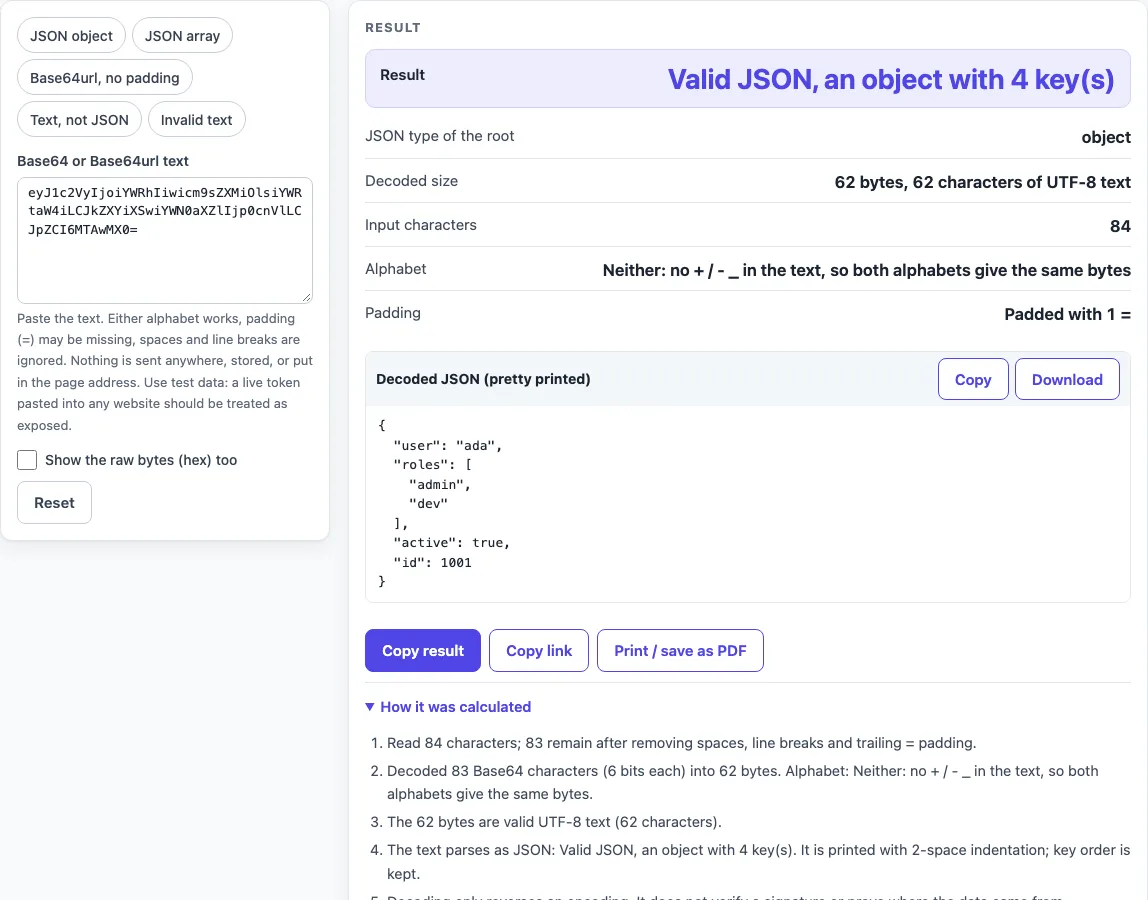
How to use the Base64 to JSON decoder
- Paste your Base64 or Base64url text into the field labelled Base64 or Base64url text. Spaces and line breaks are accepted anywhere in the text.
- If one fits your input, pick a preset: JSON object (the default), JSON array, Base64url, no padding, Text, not JSON or Invalid text.
- Tick Show the raw bytes (hex) if you also want the bytes.
- Read the Result row and the JSON type of the root row. Then check Decoded size, Input characters, Alphabet and Padding.
- Look at the block labelled Decoded JSON (pretty printed). Press Copy to copy it, or Download decoded.json to save it as a file.
- If a “Decoded twice?” block appears, it shows the result of the second decode.
The hex view shows the first 1,024 bytes, 16 per line with offsets. Pasted text is never put in the page address, so a copied link does not contain it. Use Copy result to copy the numbers as text, Copy link to copy a web address that reopens the tool with your non-secret settings, and Print / save as PDF to keep a record. Reset returns the tool to its starting sample. Press Reset to return to the starting sample.
How do I decode Base64 to JSON?
Base64 represents bytes using 64 printable characters. Decoding reverses this: every 4 characters become 3 bytes, and those bytes are read as UTF-8 text. If that text is valid JSON, the tool prints it with 2-space indentation and keeps the key order.
Does it work with Base64url (- and _)?
Yes. Base64url uses - and _ in place of + and /, as defined in RFC 4648 section 5. The Alphabet row reports Base64 standard, Base64url, Mixed or Neither. A Mixed result, where both kinds of character appear, is shown with a warning.
Why does it say invalid length?
Base64 turns every 3 bytes into 4 characters of 6 bits each. A text of 4k+1 characters cannot be valid, because its last character would hold only 6 bits, less than one byte. Check that you copied the whole value.
Why “not valid UTF-8”?
The page checks that the decoded bytes are valid UTF-8 (RFC 3629) before it parses JSON. This error means the bytes are binary or use another text encoding. The message gives the number of the first bad byte and the next 8 bytes in hex. JSON exchanged between systems must be UTF-8 (RFC 8259 section 8.1).
Can it show the raw bytes?
Yes. Tick Show the raw bytes (hex). The bytes appear as spaced hex, 16 per line with offsets, for the first 1,024 bytes. For example, a JSON object starts with the byte 7b.
What about missing = padding?
Padding is optional when the length is known (RFC 4648 section 5), which is why URL-safe tokens usually have none. The tool accepts missing padding and reports it in the Padding row. A wrong number of = adds a warning, while = followed by more text, or more than two =, is an error.
Is my data uploaded or kept in the link?
No. Decoding runs in your browser. The input field is treated as secret: the text is not stored, is not read from or written to the page address, and is not sent anywhere.
It decodes to more Base64?
Some values are encoded twice. If the decoded text is not JSON but looks like Base64 (or is a dot-separated token whose first part does), the tool tries one more decode. If that gives valid JSON, the “Decoded twice?” hint shows it in its own block.
Sources (checked 2026-10-15): RFC 4648; RFC 3629; RFC 8259.
Worked examples
| Input | Result |
|---|---|
| eyJ1c2VyIjoiYWRhIiwicm9sZXMiOlsiYWRtaW4iLCJkZXYiXSwiYWN0a... | object, 62 bytes |
| WzEsMix7ImEiOm51bGx9LCJ0aHJlZSJd | array, 24 bytes |
| eyJxdWVyeSI6ImE_Yj5jfmQiLCJuZXh0IjoiL2hvbWUveD95PnoifQ | object, 40 bytes |
| aGVsbG8sIHRoaXMgaXMgcGxhaW4gdGV4dCBhbmQgbm90IEpTT04= | not JSON, 38 bytes |
Calculated by the tool above; open it with the same values to see each step.
Frequently asked questions
Can I paste text with line breaks or spaces?
Yes. Whitespace and line breaks are accepted anywhere in the input, so you can paste a value that wraps across several lines.
What happens to large numbers in the JSON?
Numbers with more than 16 digits trigger a warning. The page re-prints them as double-precision numbers, so the digits may change.
Does a valid result mean the token is genuine?
No. Decoding is not verification. The tool does not check a signature or an origin, so a valid result only shows that the text is readable JSON.
Is there a size limit?
Yes. Input over 1,000,000 characters is reported as an error.
Should I paste a live production secret?
Treat any live production secret pasted into any website as exposed. Test values are a safer choice for trying the tool.
Can I share or print my result?
Copy result copies the numbers as text, Copy link copies a web address that reopens the tool with your non-secret settings, and Print / save as PDF opens your browser’s print dialog. Secret fields are left out of the link.
Does it accept data: URLs or JSON inside a JWT?
It decodes plain Base64 or Base64url text only. For a whole token, paste just one dot-separated part, or use the JWT decoder. A leading “data:” prefix is not removed, so paste only the encoded part.
Related tools
- Base64url encoder and decoder: use it to convert text to and from Base64url in either direction.
- Base32 decoder: use it when your value uses Base32 rather than Base64.
- Token decoder: use it to read the parts of a token and see their contents.
- SHA256 hash generator: use it to produce a SHA256 hash of a piece of text.
- HMAC SHA256 generator: use it to create an HMAC SHA256 value from a message and a key.
- JWT decoder: use it to read the header and payload of a JSON Web Token.