Base32 Decode and Encode
Paste Base32 to decode it, or switch to encode.
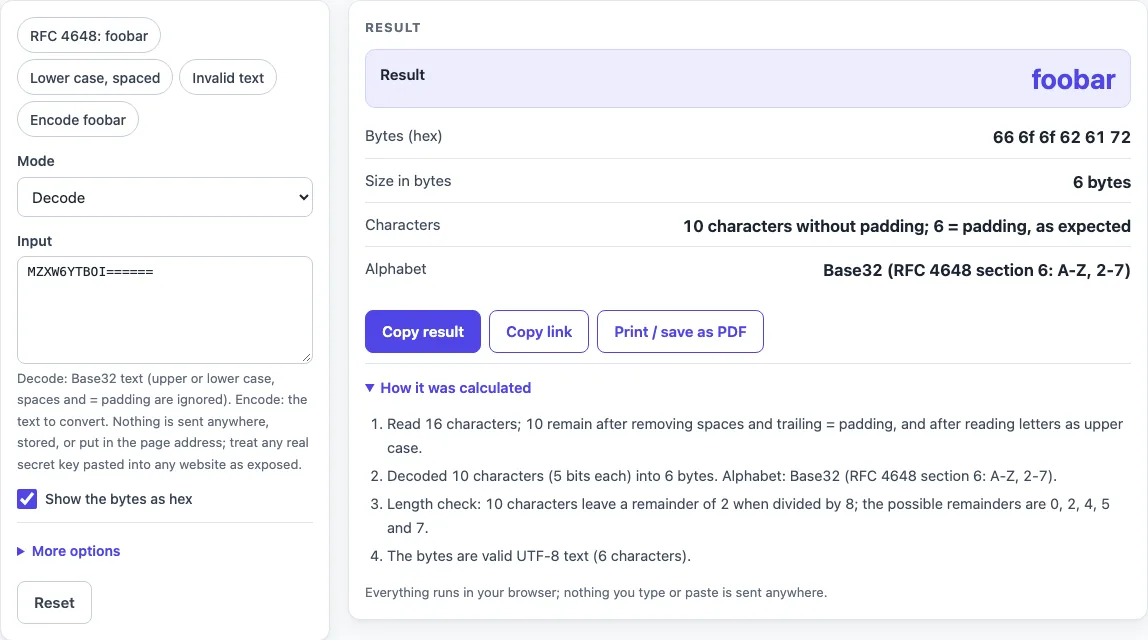
How to use the Base32 decoder
- Leave “Mode” set to Decode, which is the default.
- Paste your Base32 text into “Input”. To try a known example first, use the “RFC 4648: foobar” preset.
- Read the “Result” row. If it shows “(N bytes that are not valid UTF-8 text: see the hex)”, read the “Bytes (hex)” row instead.
- Check “Size in bytes” for the byte count, and “Characters” for the character count without padding and the padding verdict.
- Open “More options” to change “Alphabet” to Base32hex, or to turn “Show the bytes as hex” on or off.
- If you see an error, read it. It names the bad character and its position, or the length remainder that was found.
The presets are “RFC 4648: foobar” (the default), “Lower case, spaced”, “Invalid text” and “Encode foobar”. “Invalid text” is useful for seeing what an error looks like. Empty input is an error, and input over 1,000,000 characters is refused.
Use test values here. Any live production secret pasted into any website should be treated as exposed. Use Copy result to copy the numbers as text, Copy link to copy a web address that reopens the tool with your non-secret settings, and Print / save as PDF to keep a record. Reset returns the tool to its starting sample.
How do I decode Base32?
Paste the Base32 text into “Input”, and the decoder converts each character back into a 5-bit value, then rebuilds the original bytes. The “Result” row shows those bytes as text when they are valid UTF-8, and “Bytes (hex)” always shows them as hex.
Base32 uses 32 characters, and each character carries 5 bits. Eight characters carry 40 bits, which is exactly 5 bytes, so the decoder reads the input in groups of 8 characters. For example, MZXW6YTBOI====== decodes to foobar, which is the hex 66 6f 6f 62 61 72, 6 bytes long. The padding at the end fills the last group and is not data. A decoded result only shows you the bytes behind the string. It does not prove that the content is trustworthy or that it is accepted by anything else.
Why does it reject 0, 1, 8, 9?
The Base32 alphabet defined in RFC 4648 section 6 is A-Z and 2-7. The digits 0, 1, 8 and 9 are not in that alphabet, so the decoder rejects them. The error names the digit and gives its position, counted from 1 in the text as you pasted it.
For example, MZXW6YT0OI fails because the digit 0 at position 8 is not in the Base32 alphabet. If your text uses the digits 0-9 and the letters A-V, it is probably Base32hex, which is defined in RFC 4648 section 7. Change “Alphabet” under “More options” to Base32hex to decode it.
What is Base32 used for?
RFC 4648 section 6 describes Base32 as a form for arbitrary bytes that needs to be case insensitive but need not be human readable. The standard alphabet leaves out the digits 0, 1, 8 and 9. That is why MZXW6YTBOI====== can be typed in either case and why the decoder accepts spaces. Like every Base32 text, it is an encoding, not encryption: anyone can decode it.
Sources (checked 2026-10-15): RFC 4648.
Worked examples
| Input | Result |
|---|---|
| decode: MZXW6YTBOI====== | foobar |
| decode: jbsw y3dp eb3w 64tm mq | Hello world |
| encode: foobar | MZXW6YTBOI====== |
| decode: CPNMUOJ1E8====== | foobar |
Calculated by the tool above; open it with the same values to see each step.
Frequently asked questions
Is Base32 case sensitive?
No, not when decoding here. The decoder treats upper and lower case letters the same, so jbsw y3dp eb3w 64tm mq decodes just like its uppercase form. The “Lower case, spaced” preset shows this.
Does it need = padding?
No. Padding is optional when decoding, and missing padding is accepted. If padding is present but the amount is not the expected one, decoding continues and shows a warning. Padding can be at most 6 characters, and it only appears at the very end.
What is Base32hex?
Base32hex is an alphabet of 0-9 and A-V, defined in RFC 4648 section 7. It keeps the sort order of the encoded data, which the standard alphabet does not. For example, CPNMUOJ1E8====== is the Base32hex form of foobar. Select it under “More options” and “Alphabet”.
Why “invalid length”?
After padding is removed, the number of characters must give a remainder of 0, 2, 4, 5 or 7 when divided by 8. Other remainders cannot be a whole number of bytes. The error says which remainder was found, so you can check whether the string was cut short or has extra characters.
Why do I get hex instead of text?
The decoded bytes are not valid UTF-8 text, so the “Result” row shows the byte count and asks you to read the hex. For example, 777A==== decodes to the bytes ff fe, which are not text. The “Bytes (hex)” row still shows every byte.
Can I encode too?
Yes. Change “Mode” to Encode, and the tool converts your text into UTF-8 bytes and then into Base32. Every 5 bytes become 8 characters. “Add = padding” is on by default and pads the output to a multiple of 8 characters. Turn on Base32hex under “Alphabet” to use that alphabet instead.
Related tools
- Base64url encoder and decoder: use it when your encoded text uses the Base64url format instead of Base32.
- Base64 to JSON decoder: use it when a Base64 string contains JSON that you want to read.
- Token decoder: use it to read the parts of a token that is encoded in a similar way.
- SHA256 hash generator: use it to create a SHA256 hash of a text value.
- HMAC SHA256 generator: use it to create an HMAC SHA256 value from a text and a key.
- JWT decoder: use it to read the header and payload of a JSON Web Token.