JWT Decoder
Paste a JSON Web Token to read its header, payload and claims, and see whether it has expired.
JWT decoder: this tool reads a JSON Web Token and shows what it contains: the algorithm, the header and payload as formatted JSON, the registered claims, and whether the token is expired by this device’s clock. It runs in your browser, is free, and needs no sign-up. Paste a token into the Token box and the results appear at once, with no button to press.
Decoding only reads the token. The signature is never checked on this page, so a decoded token is only text until its signature is verified. Use this decoder to inspect a token, and the JWT validator to check it against a key.
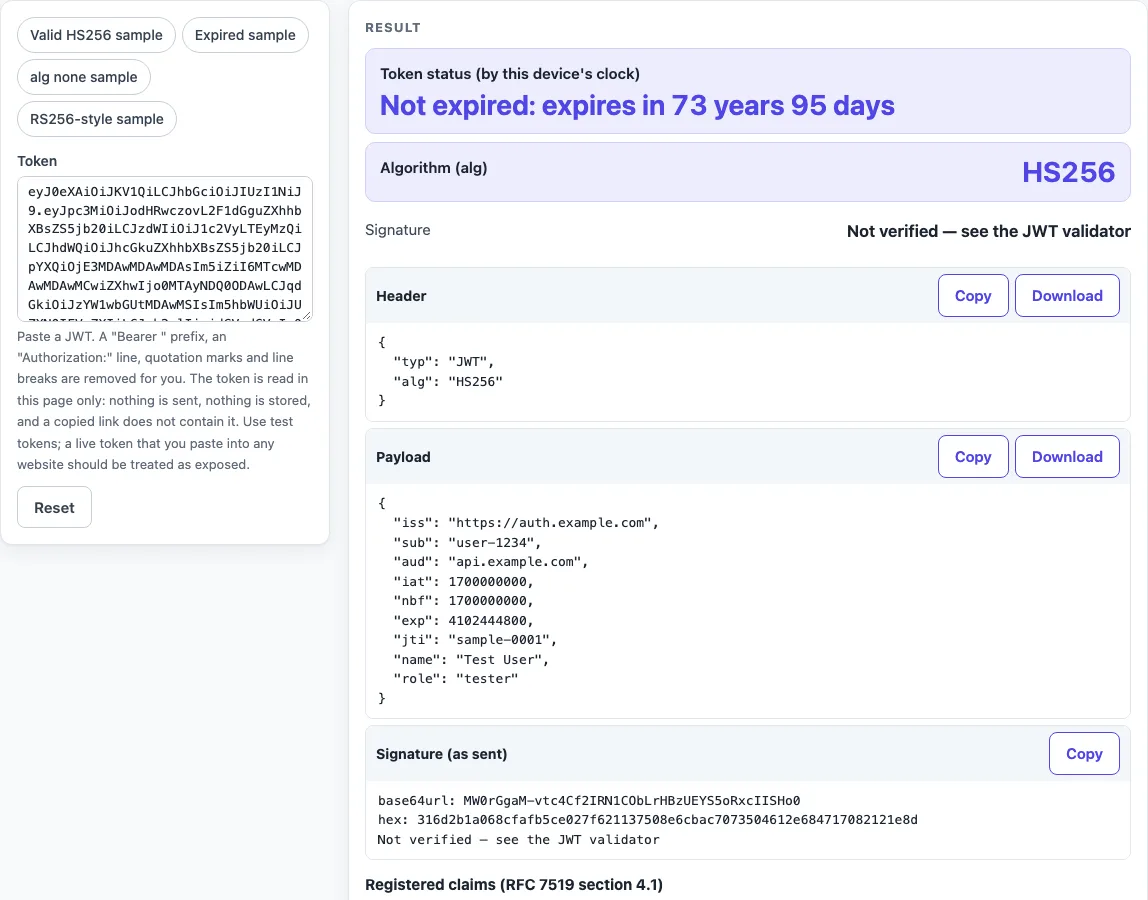
How to use the JWT decoder
- Click the Token box and paste your token. A bare token works, and so do “Bearer
”, an “Authorization:” line, quotation marks and line breaks. These are removed for you. - Read Token status (by this device’s clock) first. It says whether the token is expired, not valid yet, has no expiry, or cannot be judged.
- Check Algorithm (alg) and Header notes. Header notes appear only when there is something to say.
- Open the Header and Payload code blocks. Each has a Copy button and a Download button.
- Read the Registered claims (RFC 7519 section 4.1) table. Its columns are Claim, Name, Value, Time (UTC), Relative to now and Note. It has rows only for claims that are present.
- Read Signature, which always says “Not verified — see the JWT validator”. Signature (as sent) shows the raw signature in base64url and hex.
- To try the tool first, pick a preset: “Valid HS256 sample” (the default), “Expired sample”, “alg none sample” or “RS256-style sample”.
The Token field is a secret field, so a copied link never contains your token. Nothing you paste is sent or stored. Tokens longer than 1,000,000 characters are cut, with a warning. Use Copy result, Copy link or Print / save as PDF to keep the result, and Reset to return to the sample.
How do I decode a JWT?
A JWT is three Base64url parts joined by dots: header, payload and signature. Decoding means Base64url-decoding the header and payload and reading them as UTF-8 JSON, and it needs no key.
The tool splits the token at the dots, decodes each part and shows the result as formatted JSON. If the input has the wrong number of parts, or a part is not Base64url, not UTF-8 or not JSON, the page shows a plain-English error instead.
Can I decrypt a JWT?
Usually there is nothing to decrypt. A signed JWT (the JWS compact form, RFC 7515 section 7.1) is encoded, not encrypted, so you decode it. “Jwt decrypt” on a normal token is therefore a misnomer.
An encrypted JWT (the JWE compact form, RFC 7516) has five parts: protected header, encrypted key, initialization vector, ciphertext and authentication tag. It cannot be read without the decryption key, so this page says so instead of guessing.
Is the payload secret?
No. Anyone who has the token can read the payload. RFC 7519 section 12 tells issuers to keep privacy-sensitive data out of the JWT, or to use an encrypted JWT or TLS. Do not put secrets in a payload.
Does decoding check the signature?
No. The signature is never checked on this page. Decoding is not verifying: anyone can write any payload and sign it with their own key.
Only a valid signature, checked with the right key, shows that the token was not changed. RFC 8725 section 3.8 says keys must belong to the issuer. Use the JWT validator for that check.
Why does my token say expired?
The token is expired when the clock is on or after exp (RFC 7519 section 4.1.4). The clock used is this device’s clock when the page runs, and no clock-skew allowance is applied. Check that your device’s clock is correct.
For example, with the RFC 7515 appendix A.1 token, exp is 1300819380. At that clock time the page reads “Expired less than a second ago”, and one second earlier it reads “Not expired: expires in 1 second”.
A common cause is milliseconds. The exp, nbf and iat values are seconds since 1970-01-01T00:00:00Z. A value in milliseconds is read as a date thousands of years away. The page flags a time claim as “milliseconds” when its absolute value is above 1e11, which would be the year 5138 in seconds.
What do iss, sub, aud, exp, nbf, iat, jti mean?
These are registered claims in RFC 7519 section 4.1. The table lists them in this order: iss (Issuer), sub (Subject), aud (Audience), exp (Expiration time), nbf (Not before), iat (Issued at) and jti (JWT ID).
The aud claim may be a string or an array of strings (section 4.1.3). The jti claim is a unique id (section 4.1.7). The exp, nbf and iat claims are NumericDate values, shown in ISO UTC such as 2023-11-14T23:13:20Z. The page adds a note when iat is later than the clock.
Sources (checked 2026-10-15): RFC 7519; RFC 7515; RFC 7516; RFC 8725.
Worked examples
| Input | Result |
|---|---|
| eyJ0eXAiOiJKV1QiLCJhbGciOiJIUzI1NiJ9.... | alg HS256, exp 2100-01-01T00:00:00Z |
| eyJ0eXAiOiJKV1QiLCJhbGciOiJIUzI1NiJ9.... | alg HS256, exp 2023-11-14T23:13:20Z |
| eyJhbGciOiJub25lIiwidHlwIjoiSldUIn0.e... | alg none, exp none |
| eyJhbGciOiJSUzI1NiIsInR5cCI6IkpXVCIsI... | alg RS256, exp 2100-01-01T00:00:00Z |
Calculated by the tool above; open it with the same values to see each step.
Frequently asked questions
Is it safe to paste my JWT into this page?
The page makes no network request, and the code has none. Still, treat a live production token pasted into any website as exposed. Test tokens, or tokens that have already expired, are better for this.
How do I decode a JWT in Python or Node?
In Python, run this with the token in the shell variable TOKEN. It prints the payload as a dict:
python3 -c "import base64,json,sys; t=sys.argv[1].split('.')[1]; print(json.loads(base64.urlsafe_b64decode(t+'='*(-len(t)%4))))" "$TOKEN"
In Node.js 16 or later, this prints the payload object:
node -e "console.log(JSON.parse(Buffer.from(process.argv[1].split('.')[1],'base64url')))" "$TOKEN"
What does “alg none” mean?
It means the token is unsigned. RFC 8725 sections 2.1 and 3.2 describe attacks that change alg to none, and libraries should not accept none unless the caller asks for it. The “alg none sample” preset shows this case.
Why does the page say my token is an encrypted JWT?
The token has five dot-separated parts, which is the JWE form (RFC 7516). It needs the decryption key, which this page does not have.
Can I paste a token that starts with “Bearer”?
Yes. The text “Bearer
What do the Header notes mean?
They point out header settings that deserve attention, each with an RFC citation. Examples include a missing alg, an alg of none, a jku or x5u value, a jwk or x5c value, a crit value, or a typ other than JWT. A note is not a verdict on the token.
Does a valid result mean an API will accept my token?
No. A decoded token is only text, and a valid decode never proves that an API or a payload is acceptable.
Related tools
- JWT validator: use it to check a token’s signature against a key.
- JWT expiration checker: use it when you only need to see whether exp has passed.
- JWT generator: use it to create test tokens for trying out claims.
- JWT secret generator: use it to make a random secret for signing test tokens.
- Token decoder: use it to read other encoded tokens.
- Base64url encoder and decoder: use it to convert the Base64url parts by hand.
- HMAC SHA256 generator: use it to compute an HMAC SHA256 value for comparison.